社区所有版块导航
Python
python开源   Django   Python   DjangoApp   pycharm  
DATA
docker   Elasticsearch  
aigc
aigc   chatgpt  
WEB开发
linux   MongoDB   Redis   DATABASE   NGINX   其他Web框架   web工具   zookeeper   tornado   NoSql   Bootstrap   js   peewee   Git   bottle   IE   MQ   Jquery  
机器学习
机器学习算法  
Python88.com
反馈   公告   社区推广  
产品
短视频  
印度
印度  
Py学习  »  Python

9 月更新 | Visual Studio Code Python

玩转VSCode • 3 年前 • 509 次点击  

点击上方蓝字

关注我们

(本文阅读时间:7分钟)


我们很高兴地宣布,2022 年 9 月发布的适用于 Visual Studio Code Python 和 Jupyter 扩展现已推出!

此版本包括以下改进:

  • 改进了对 Jupyter 笔记本的 IntelliSense 支持

  •  一个新的 Flake8 扩展

  • 试行功能:改进的单元测试和笔记本图像粘贴

如果您有兴趣,可以在我们的更新日志中查看 Python、Jupyter 和 Pylance 扩展的完整改进记录。

  • Python 1:

    https://marketplace.visualstudio.com/items?itemName=ms-python.python

  • Jupyter 1:

    https://marketplace.visualstudio.com/items?itemName=ms-toolsai.jupyter

  • Python 2:

    https://github.com/microsoft/vscode-python/releases?ocid=AID3045631

  • Jupyter 2:

    https://github.com/microsoft/vscode-jupyter/blob/main/CHANGELOG.md?ocid=AID3045631

  • Pylance:

    https://github.com/microsoft/pylance-release/blob/main/CHANGELOG.md?ocid=AID3045631


改进了对 Jupyter 笔记本的 IntelliSense 支持


现在对于使用 Python 内核的 Jupyter Notebook,在使用 Pylance 时,IntelliSense 支持变得更加完善,这要归功于语言服务器协议中的更新对 Jupyter 的支持。

在笔记本文件中编写 Python 代码时,您不仅会获得改进的自动完成建议,而且还可以使用重构功能,例如提取变量、提取方法以及自动导入。

  • 主题:Horizon Extended

    https://marketplace.visualstudio.com/items?itemName=LanceWilhelm.horizon-extended

  • Pylance:

    https://marketplace.visualstudio.com/items?itemName=ms-python.vscode-pylance

  • IntelliSense:

    https://code.visualstudio.com/docs/editor/intellisense?ocid=AID3045631

  • 语言服务器协议中的更新:

    https://microsoft.github.io/language-server-protocol/specifications/lsp/3.17/specification/#whatIsNew?ocid=AID3045631


Flake8 扩展


在发布 pylint 、black 和 isort 扩展之后,我们现在很高兴地宣布我们有了一个新的 flake8 扩展!与其他扩展一样,这个新扩展使用语言服务器协议来提供 linting 支持,并且由于它附带最新版本的 Flake8,因此您不再需要在 Python 环境中安装 Flake8。

您可以直接将它与 Pylint 扩展一起使用,因为二者并不冲突:

  • 主题:Horizon Extended

    https://marketplace.visualstudio.com/items?itemName=LanceWilhelm.horizon-extended
您可以从市场上安装这个新扩展来试用它。如果您有任何问题或功能请求,可以将它们提交到 Flake8 扩展的 GitHub 存储库。
  • pylint:

    https://marketplace.visualstudio.com/items?itemName=ms-python.pylint

  • black:

    https://marketplace.visualstudio.com/items?itemName=ms-python.black-formatter

  • isort:

    https://marketplace.visualstudio.com/items?itemName=ms-python.isort

  • flake8:

    https://marketplace.visualstudio.com/items?itemName=ms-python.flake8

  • 从市场上安装:

    https://marketplace.visualstudio.com/items?itemName=ms-python.flake8

  • Flake8 扩展的 GitHub 存储库:

    https://marketplace.visualstudio.com/items?itemName=ms-python.flake8


试行功能:改进的单元测试和笔记本图像粘贴


改进的 unittest 支持

今年夏天,Python 扩展团队很高兴地迎来了一位新实习生 Anthony Kim。在实习期间,他致力于改进使用 unittest 运行测试。他还开始研究如何在 Python 扩展中改进对 pytest 的支持,但不幸的是,他在我们这里的 12 周时间太短了,无法实施这些额外的更改。

团队正在继续他的改进工作,请持续关注我们对 pytest 的改进。

笔记本图片粘贴

我们还欢迎 Michael Lively 成为我们的 Jupyter 扩展团队实习生,他的工作是将屏幕截图和图像文件粘贴到笔记本中的 Markdown 单元格中。
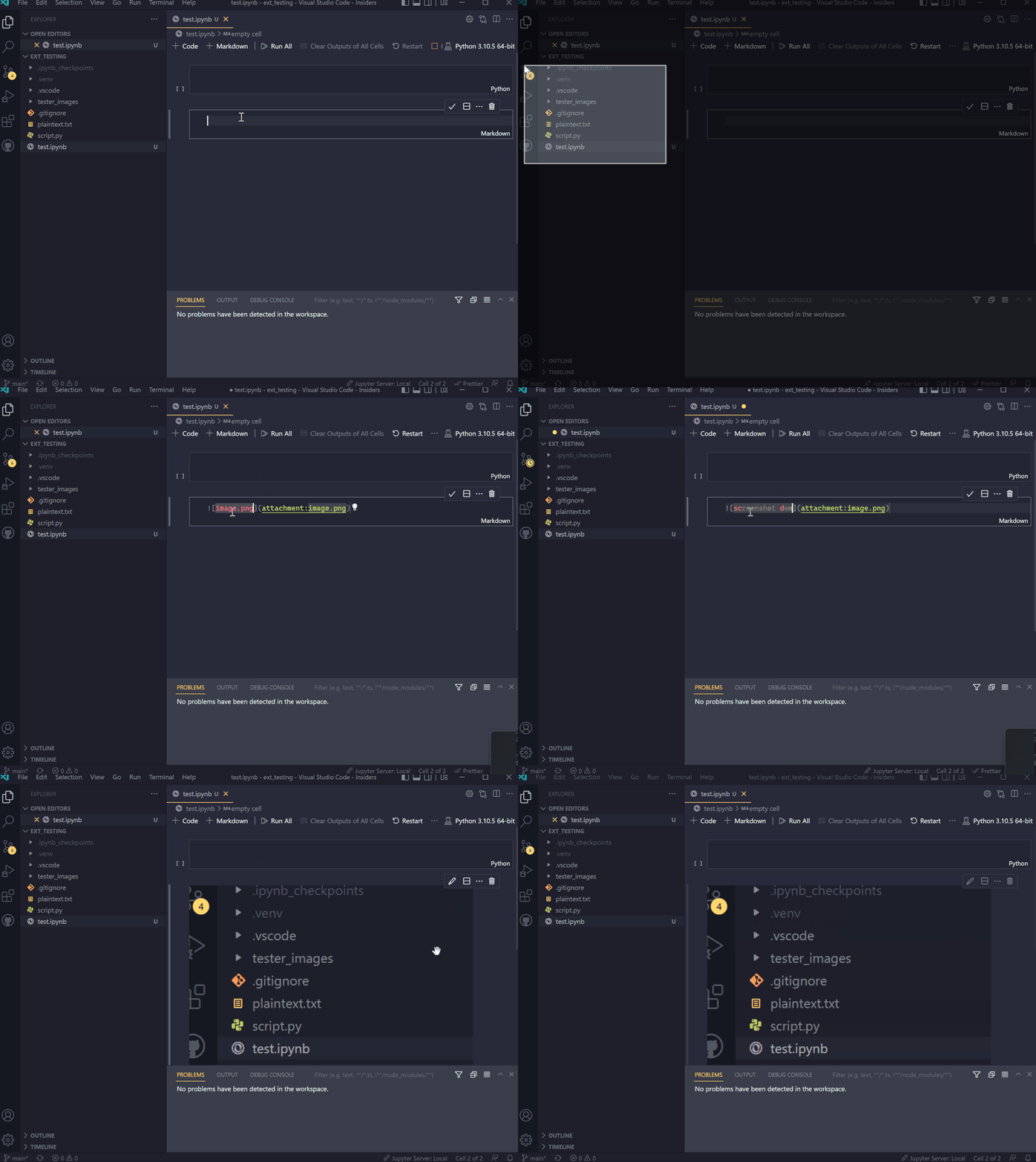
它目前支持 image/png 类型,您可以添加以下设置来使用该功能:

"ipynb.experimental.pasteImages.enabled": true"editor.experimental.pasteActions.enabled": true

团队将继续改进此功能以支持不同的图像类型。

我们要感谢两位实习生的辛勤工作,同时希望他们喜欢这次实习!如果您有兴趣了解有关 Anythony 项目的更多信息,您可以查看由我们的团队成员共同主持的 Sad Python Girls Club Podcast 的第 6 集。
  • Anthony Kim:

    https://github.com/ksy7588?ocid=AID3045631

  • 改进使用 unittest 运行测试:

    https://github.com/microsoft/vscode-python/pull/19386?ocid=AID3045631

  • Michael Lively:
    https://github.com/Yoyokrazy?ocid=AID3045631
  • Sad Python Girls Club Podcast 的第 6 集:

    https://anchor.fm/sad-python-girls-club/episodes/Episode-6---Anthony-Kim-e1n0lvp



其他更改和增强


我们还添加了一些小的增强功能并修复了用户请求的问题,这些功能应该可以改善您在 Visual Studio Code 中使用 Python  和 Jupyter Notebooks 的体验。一些显着的变化包括:

  • 您现在可以通过选择器中的新按钮清除和刷新 Python 解释器列表( vscode-python#19628 )

    https://github.com/microsoft/vscode-python/pull/19628?ocid=AID3045631

  • Debugpy 已更新到版本 1.6.3 ( vscode-python#19698 )

    https://github.com/microsoft/vscode-python/pull/19698?ocid=AID3045631

  • 在 Jupyter 中导入 Python 模块/文件时,Pylance 现在不再显示错误警告( pylance-release#3017 )

    https://github.com/microsoft/pylance-release/issues/3017?ocid=AID3045631

  • 使用 Pylance 时,在 Jupyter 中不同单元格之间重命名符号不再失败( pylance-release#3061 )

    https://github.com/microsoft/pylance-release/issues/3061?ocid=AID3045631

  • 由于 matplotlib 类型存根的更新,使用 Pylance 时 IntelliSense 对 matplotlib 的支持得到了改进( python-type-stubs#223 )

    https://github.com/microsoft/python-type-stubs/pull/223?ocid=AID3045631

我们还要特别感谢本月的贡献者:

  • cpinamtz:修复不在起始路径的 HOME 文件夹替换(vscode-python#19326)

  • parched:仅显示 pytest 参数化测试的 args ( vscode-python#19479 )
  • cpinamtz:

    https://github.com/cpinamtz?ocid=AID3045631

  • vscode-python#19326:

    https://github.com/microsoft/vscode-python/pull/19326?ocid=AID3045631

  • parched:

    https://github.com/parched?ocid=AID3045631
  • vscode-python#19479:
    https://github.com/microsoft/vscode-python/pull/19479?ocid=AID3045631


通过从 Marketplace 更新或下载 Python 扩展和Jupyter 扩展来尝试这些新改进,或者直接从 Visual Studio Code 中的扩展视图安装它们(Ctrl + Shift + X 或 ⌘ + ⇧ + X)。您可以在文档中了解有关 Visual Studio Code Python 的更多信息。如果您遇到任何问题或有建议,请在 Python VS Code GitHub 页面上提出问题。

  • Python 扩展:

    https://marketplace.visualstudio.com/items?itemName=ms-python.python

  • Jupyter 扩展:

    https://marketplace.visualstudio.com/items?itemName=ms-toolsai.jupyter

  • 文档:

    https://code.visualstudio.com/docs/python/python-tutorial?ocid=AID3045631

  • GitHub:

    https://github.com/Microsoft/vscode-python?ocid=AID3045631

  • 提出问题:

    https://github.com/microsoft/vscode-python/issues/new/choose?ocid=AID3045631


推荐阅读:


玩转VS Code

VS Code · 编程开发 · 业界资讯

Python社区是高质量的Python/Django开发社区
本文地址:http://www.python88.com/topic/148149