作者:量化小白H Python爱好者社区专栏作者
个人公众号:量化小白上分记
近期根据小说《斗破苍穹》改编的同名电视剧正在热映,本文对《斗破苍穹》进行文本分析,分为两部分,首先爬取豆瓣影评进行简单分析,随后对于原创小说文本中的人物进行详细分析,文章代码和数据在后台回复"斗破苍穹"可得。
1.影评分析
爬取影评直接使用之前蚁人的代码,不再说明,共爬到影评数据500条。
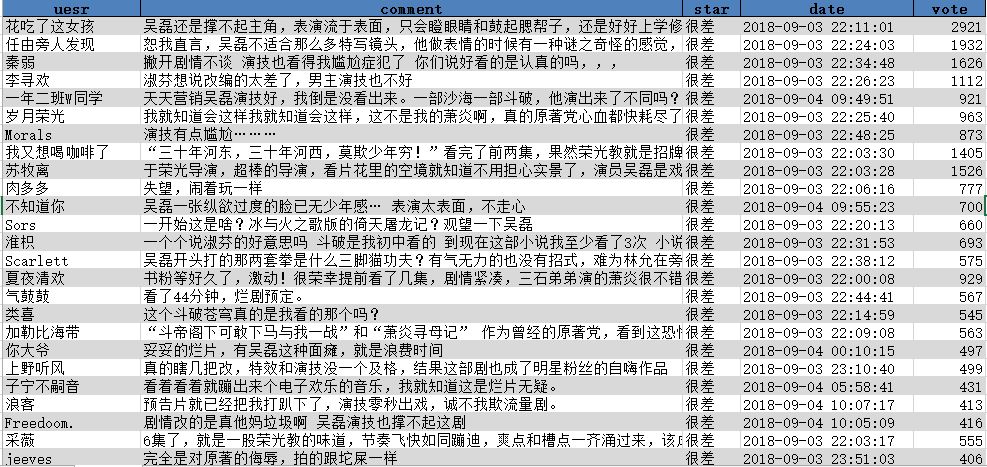
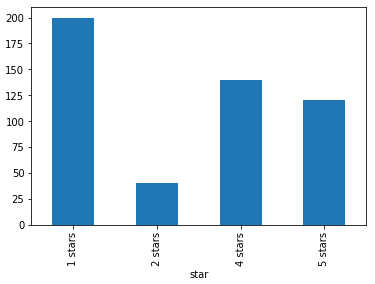
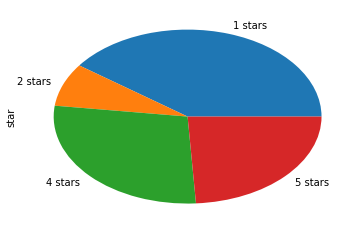
简单统计来看,一星差评最多,但四五星评价与一二星差评价基本持平。
不过从投票数来看,投票数最多的前25条,无一例外都是一星差评
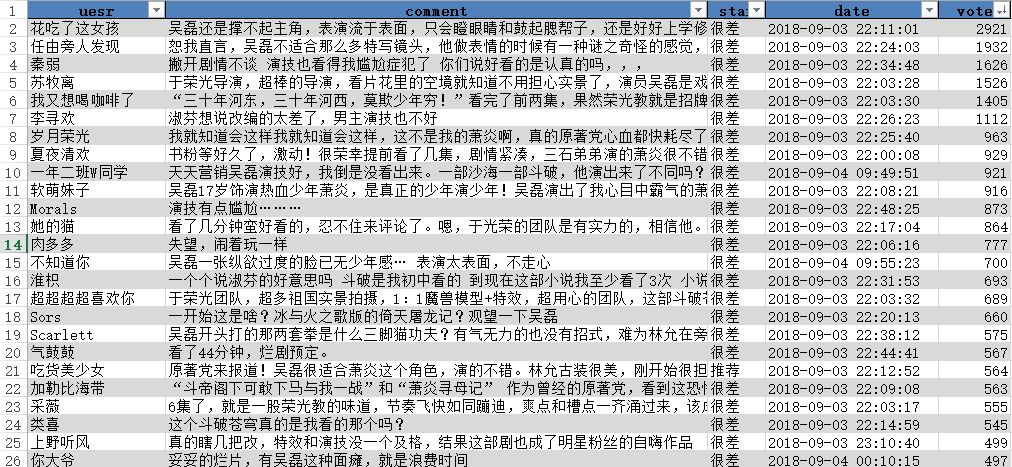
大家给差评的原因也很统一,电视剧对小说改编过多,原著党难以接受,再加上5毛钱特效和演员的尴尬演技,感觉是妥妥烂片无疑了。不妨再看看给好评的人都是些神马想法
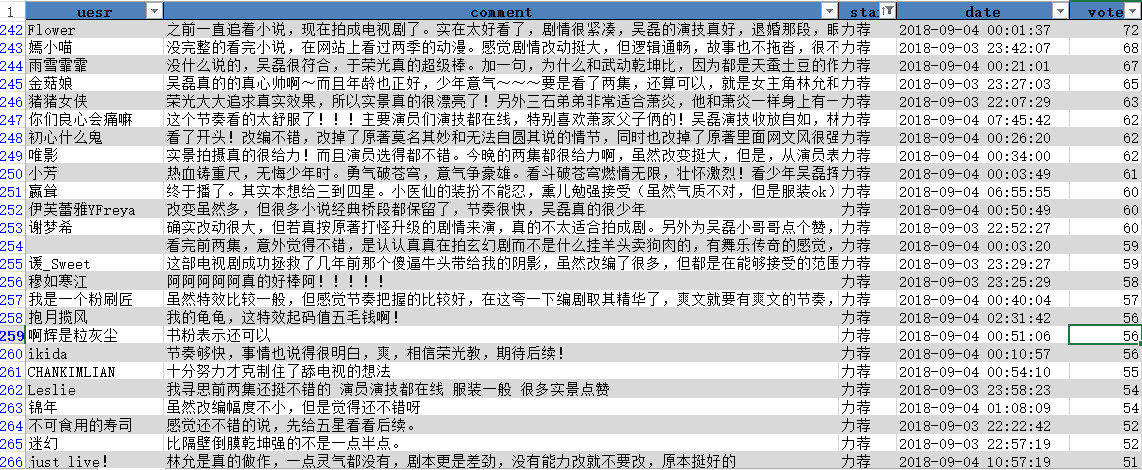
除过一些明明给了很差评价还点了力荐的观众之外,投票数最多的好评都来自于主演的粉丝,对他们来说,剧情研究都不重要,看颜就行。
2.小说文本分析
1. 人物出场频数
分析完影评,作为一名原著党,我觉得更有必要分析一下小说原文,直接百度下载到一个小说txt文件,小说共有1646章,首先来看看小说中出场次数最多的人物
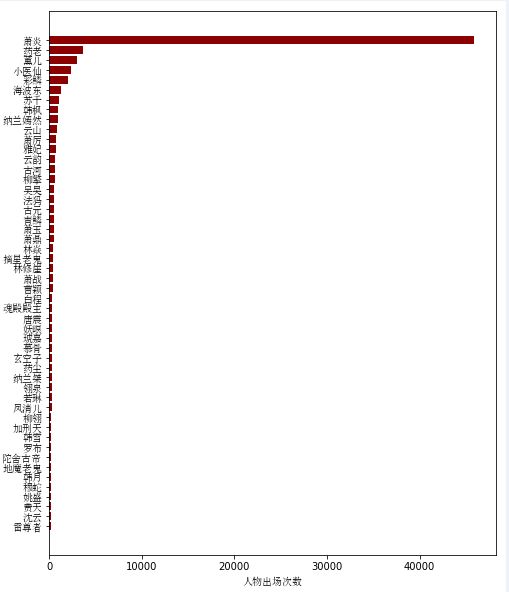
男主出场次数太多,远远高于其他人物,我们不考虑主角,看看其他人物的出场次数
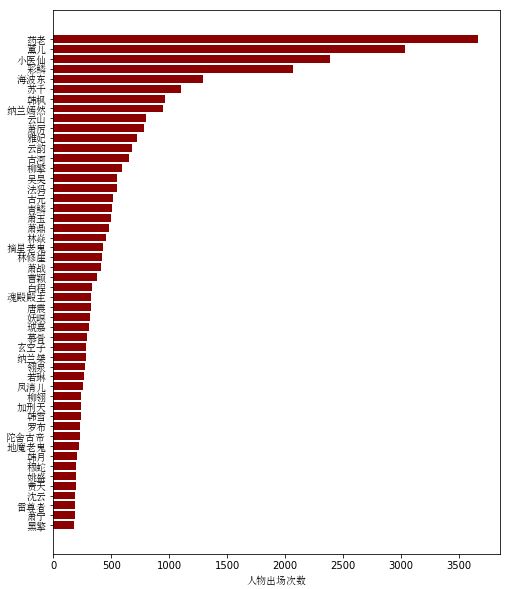
部分代码如下
1# -*- coding: utf-8 -*-
2"""
3Created on Mon Sep 17 19:51:48 2018
4
5@author: hzp0625
6"""
7
8import pandas as pd
9import os
10os.chdir('F:\\python_study\\pachong\\斗破苍穹')
11
import re
12import numpy as np
13import jieba
14import matplotlib.pyplot as plt
15from matplotlib.font_manager import FontProperties
16font = FontProperties(fname=r'c:\windows\fonts\simsun.ttc')#,size=20指定本机的汉字字体位置
17import matplotlib.pyplot as plt
18import networkx as nx
19
20
21texts = open('all(校对版全本).txt',"r")
22
23texts = texts.read()
24
25
AllChapters = re.split('第[0-9]*章',texts)[1:]
26
27AllChapters = pd.DataFrame(AllChapters,columns = ['text'])
28AllChapters['n'] = np.arange(1,1647)
29
30# 载入搜狗细胞词库
31jieba.load_userdict('斗破苍穹.txt')
32jieba.load_userdict('斗破苍穹异火.txt')
33stopwords = open('中文停用词表(比较全面,有1208个停用词).txt','r').read()
34stopwords = stopwords.split('\n')
35
36
37
38# 主要人物出现的总频数,人物名单从百度百科获取
39nameall = open('所有人物.txt','r'
).read().split('\n')
40nameall = pd.DataFrame(nameall,columns = ['name'])
41textsall = ''.join(AllChapters.text.tolist())
42nameall['num'] = nameall.name.apply(lambda x:textsall.count(x))
43
44nameall.loc[nameall.name=='熏儿','num'] = nameall.loc[nameall.name=='熏儿','num'].values[0] + nameall.loc[nameall.name=='熏儿','num'].values[0]
45nameall.loc[nameall.name=='熏儿','num'] = -886
46
47
48
49nameall.loc[nameall.name=='彩鳞','num'] = nameall.loc[nameall.name=='彩鳞','num'].values[0] + nameall.loc[nameall.name=='美杜莎'
,'num'].values[0]
50nameall.loc[nameall.name=='美杜莎','num'] = -886
51
52nameall = nameall.sort_values('num',ascending = False)
53
54
55plt.figure(figsize=(8,10))
56fig = plt.axes()
57n = 50
58plt.barh(range(len(nameall.num[:n][::-1])),nameall.num[:n][::-1],color = 'darkred')
59fig.set_yticks(np.arange(len(nameall.name[:n][::-1])))
60fig.set_yticklabels(nameall.name[:n][::-1],fontproperties=font)
61plt.xlabel('人物出场次数',fontproperties = font)
62plt.show()
2. 女主分析
从出场频数来看,排名前4的是主角的老师和三个女主,那么究竟哪一个是女一?单从出场次数来看的话可能会太过简单,我们对小说分章节统计每章中所有女主的出场次数,来看看女主出场的时间分布,横轴为章节号,纵轴为出现次数
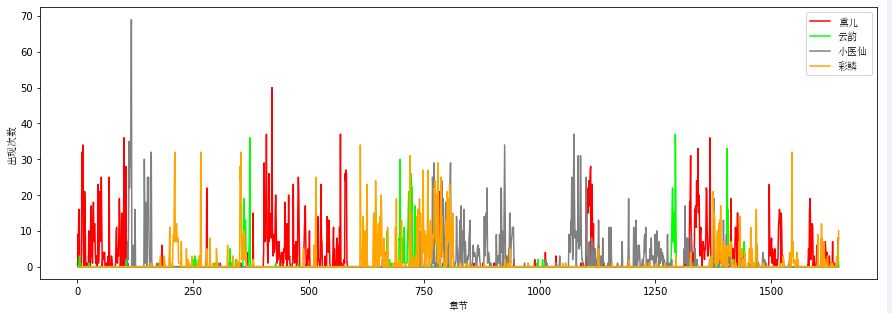
从分布图来看,前中期各个女主出场的重叠不多,每个人陪男主走过不同的剧情副本,结尾合家欢。
1# 女主每章出现次数统计:熏儿,云韵,小医仙,彩鳞,美杜莎
2
3names = ['熏儿','云韵','小医仙','彩鳞','美杜莎']
4result['熏儿'] = result.fenci.apply(lambda x:x.count('熏儿') + x.count('薰儿'))
5result['云韵'
] = result.fenci.apply(lambda x:x.count('云韵'))
6result['小医仙'] = result.fenci.apply(lambda x:x.count('小医仙'))
7result['彩鳞'] = result.fenci.apply(lambda x:x.count('彩鳞') + x.count('美杜莎'))
8
9
10plt.figure(figsize=(15,5))
11plt.plot(np.arange(1,result.shape[0]+1),result['熏儿'],color="r",label = u'熏儿')
12plt.plot(np.arange(1,result.shape[0]+1),result['云韵'],color="lime",label = u'云韵')
13plt.plot(np.arange(1,result.shape[0
]+1),result['小医仙'],color="gray",label = u'小医仙')
14plt.plot(np.arange(1,result.shape[0]+1),result['彩鳞'],color="orange",label = u'彩鳞')
15plt.legend(prop =font)
16plt.xlabel(u'章节',fontproperties = font)
17plt.ylabel(u'出现次数',fontproperties = font)
18plt.show()
3. 人物社交关系网络
接下来,我们对小说中的人物关系做一些探究,如果两个人物同时出现在文章的一个段落里,我们就认为这两个人物之间有一定的联系(也可以以句或章节为单位),以此为规则,计算所有人物的共现矩阵。所以人物列表通过百度百科获取,保存为txt文件便于读取。
将小说文本按段落划分之后,会发现共有八万多个段落,人物有一百个左右,直接循环效率太低,但观察得到的段落,有很多单字成段的语气词,这些可以直接删掉。
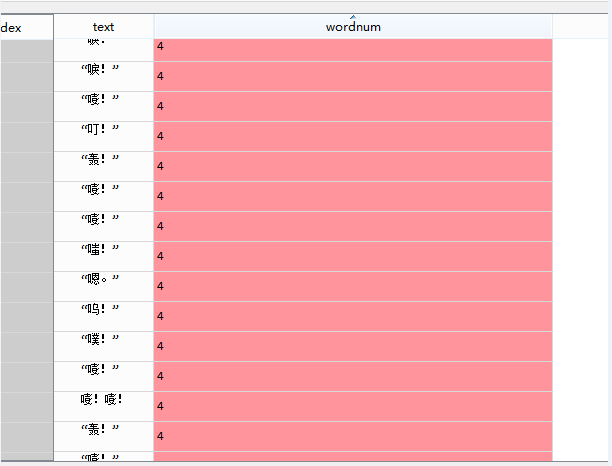
因此,对于得到的段落,我们首先删掉段落长度小于20个字的,用剩余的段落计算共现矩阵,部分主要人物的共现矩阵如下
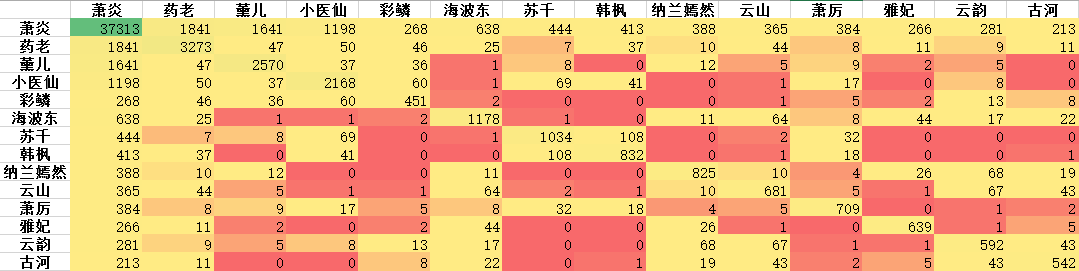
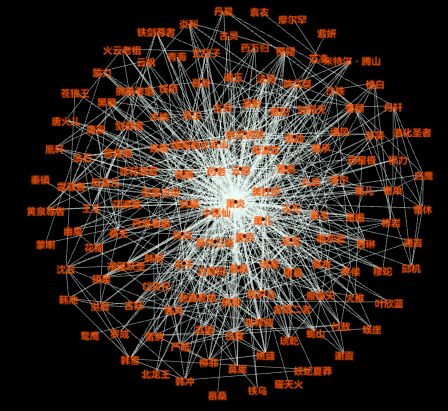
用所有人物的共现矩阵构造社交关系网络图,计算出边和节点矩阵后,用Gephi软件直接作图(python也可以用networkx作图)
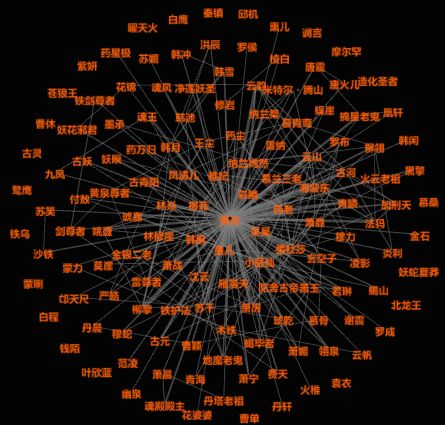
删掉边权重小于10的值后,重新作图,结果相对清晰一些,连线越宽,表明人物见的联系越紧密。
1# 社交网络图 共现矩阵
2# 两个人物出现在同一段,说明有某种关系
3words = open('all(校对版全本).txt','r').readlines()
4words = pd.DataFrame(words,columns = ['text'
],index = range(len(words)))
5words['wordnum'] = words.text.apply(lambda x:len(x.strip()))
6words = words.loc[words.wordnum>20,]
7wrods = words.reset_index(drop = True)
8relationmat = pd.DataFrame(index = nameall.name.tolist(),columns = nameall.name.tolist()).fillna(0)
9
10
11wordss = words.text.tolist()
12for k in range(len(wordss)):
13 for i in nameall.name.tolist():
14 for j in nameall.name.tolist():
15 if i in wordss[k] and j in wordss[k]:
16 relationmat.loc[i,j] += 1
17
if k%1000 ==0:
18 print(k)
19
20relationmat.to_excel('共现矩阵.xlsx')
21
22# 网络图
23
24
25# 边与权重矩阵
26#relationmat1 = pd.DataFrame(index = range(relation.shape[]))
27relationmat1 = {}
28for i in relationmat.columns.tolist():
29 for j in relationmat.columns.tolist():
30 relationmat1[i, j] = relationmat.loc[i,j]
31
32
33edgemat = pd.DataFrame(index = range(len(relationmat1)))
34node = pd.DataFrame(index = range(len(relationmat1)))
35
36edgemat['Source'] = 0
37edgemat['Target'] = 0
38edgemat['Weight'] = 0
39
40node['Id'] = 0
41node['Label'] = 0
42node['Weight'] = 0
43
44
45names = list(relationmat1.keys())
46weights = list(relationmat1.values())
47for i in range(edgemat.shape[0]):
48 name1 = names[i][0
]
49 name2 = names[i][1]
50 if name1!=name2:
51 edgemat.loc[i,'Source'] = name1
52 edgemat.loc[i,'Target'] = name2
53 edgemat.loc[i,'Weight'] = weights[i]
54 else:
55 node.loc[i,'Id'] = name1
56 node.loc[i,'Label'] = name2
57 node.loc[i,'Weight'] = weights[i]
58 i+=1
59
60
61edgemat = edgemat.loc[edgemat.Weight!=0,]
62edgemat = edgemat.reset_index(drop = True)
63node = node.loc[node.Weight!=0,]
64node = node.reset_index(drop = True)
65
66
67
68edgemat.to_csv('边.csv',index = False)
69node.to_csv('节点.csv',index = False)
4. 分词词云
最后,还是以小说文本的词云作为文章结尾,为了使文本分词更准确,这里我们使用了网上流传的包含1208个词的中文停用词表,以及通过搜狗细胞词库得到的两个词库,主要包含一些人名,地名,组织名称,异火等。

网址:https://pinyin.sogou.com/dict/


Python爱好者社区历史文章大合集:
Python爱好者社区历史文章列表(每周append更新一次)
 福利:文末扫码立刻关注公众号,“Python爱好者社区”,开始学习Python课程:
关注后在公众号内回复“课程”即可获取:
小编的Python入门免费视频课程!!!
【最新免费微课】小编的Python快速上手matplotlib可视化库!!!
崔老师爬虫实战案例免费学习视频。
陈老师数据分析报告制作免费学习视频。
玩转大数据分析!Spark2.X+Python 精华实战课程免费学习视频。