公众号:尤而小屋
作者:Peter
编辑:Peter
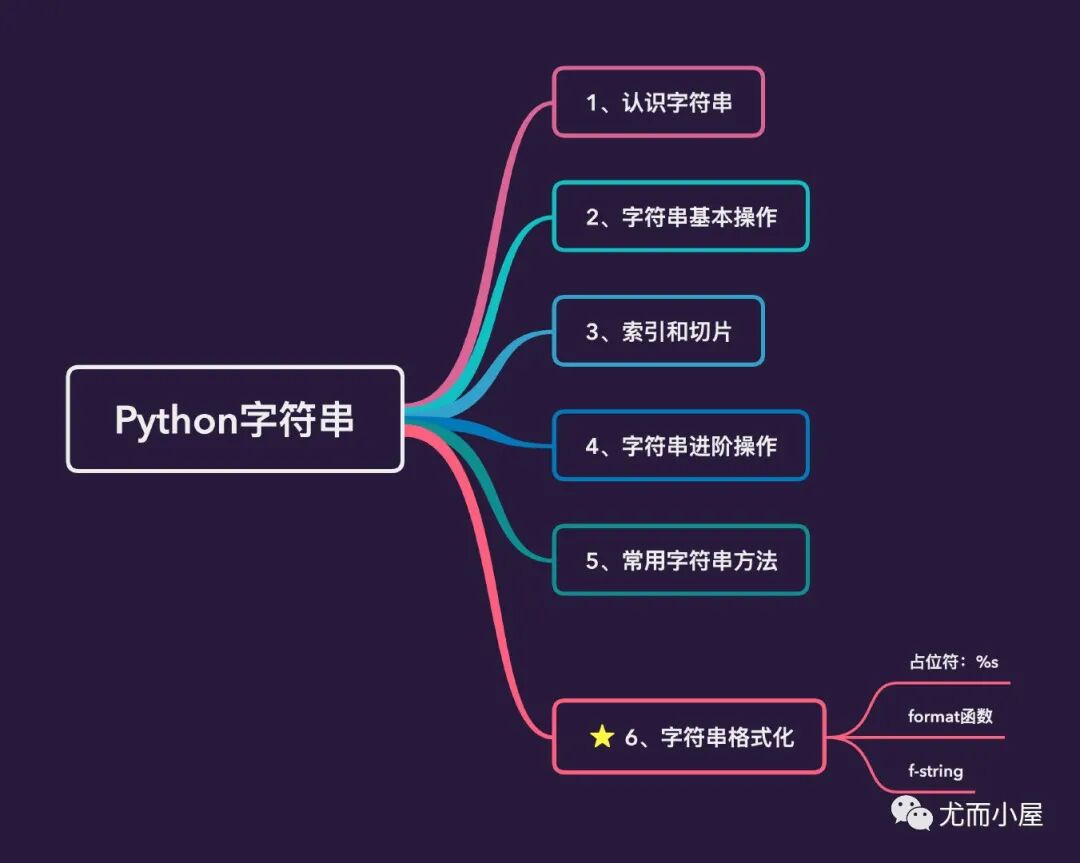
从本文开始准备介绍Python中的常见数据结构:字符串、列表、集合、字典。其中字符串、列表、字典应用非常频繁,需要重点掌握,本文介绍的是字符串及相关操作和方法。最后的字符串3种格式化方法将在下篇文章详细讲解。
pandas是Python一个非常强大的第三方数据分析和处理的库,往期精选:
图解Pandas的排序sort_values机制
图解Pandas的rank机制
一、认识字符串
字符串在Python中是一种数据对象类型,用str表示,通常用单引号或者双引号包裹起来(英文的半角符号)
字符串string,是有零个或者多个字符组成的有限串行,通常记为s=a[1]a[2]...a[m]
strings = "hello world"  # 双引号
strings
'hello world'
type(strings)
str
new_strings = 'hello python'  # 单引号
new_strings
'hello python'
通过type函数查看类型
type(new_strings)
str
type(100) # 数值型
int
type("100") # 字符串类型
str
如果字符串本身内容就有引号,我们有两种解决方式:
# 如果字符串本身内容也包含引号
# 1、双引号包裹单引号

x = "I'm Peter!"
x
"I'm Peter!"
# 使用转义字符\

y = 'I\'m Peter'
y
"I'm Peter"
# 3、使用r“字符内容":原始字符串

z = r"I'm Peter!"
z
"I'm Peter!"
二、字符串基础操作
2.1键盘输入
键盘输入的任何内容都是字符串
name = input("my name is: ")
my name is: Peter
name # 返回的是字符串类型数据
'Peter'
# 键盘输入的都是字符串类型数据

age = input("my age is: ")
my age is: 20
type(age) # 返回的仍然是字符串
str
2.2变量与字符串
python中有这样一句话:变量是无类型的,对象有类型
在下面的列子中,我们看到:变量x既可以是int类型,也可以是字符类型;但是数值5和字符串python都是有自己固定的数据类型。
x = 5 # 变量x可以贴在int类型的数字5上:赋值语句
x = "python" # 变量x也可以贴在字符串类型上
# 通过赋值语句来表示变量和字符串对象之间的引用关系

a = "hello-python"
a
'hello-python'
type(a)
str
2.3查看字符串地址
id(a)
4516524144
id(age)
4516499824
2.4原始字符串
用r开头引起的字符串就是我们常用的原始字符串,放在里面的任何字符串都是表示它的原始含义,从此不需要转义
s = "hello \npython"
print(s)  # 发生换行
hello
python
# 如何解决:1-使用转义字符
print("hello \\npython")
hello \npython
# 2-使用r包裹起来
print(r"hello \npython")
hello \npython
三、索引和切片
索引和切片是python中非常重要的一个概念,记住几点:
- 切片语法:start:end:step,step表示步长
3.1索引
使用的index()来查看某个字符的索引
str1 = "python"
id(str1)
4473172336
str2 = "thonpy"
id(str2)
4516506736
# 寻找某个字符的索引index:索引从0开始

str1.index("h")
3
str1.index("n")
5
3.2切片
关于切片总结4点:
- 含头不含尾:包含start部分,不包含stop部分
str3 = "learn python"
str3
'learn python'
# 标准切割

str3[0:4:1] # 步长为1
'lear'
str3[:
4:1] # 开头的0可以省略
'lear'
str3[:4] # 步长1也可以省略
'lear'
str3[0:4:2] # 步长为2
'la'
str3[:10] # 步长为1,切到索引为10,不包含10
'learn pyth'
str3[10:0:-2] # 步长为2
'otpna'
str3.index("o") # 从索引10的o字符开始切割,往前切
10
四、字符串进阶操作
4.1求长度
len(str3)
12
4.2返回最值
每个字符都有自己对应的数字编码,通过比较数字就可以知道对应字符的大小
max(str3) # 根据ASCII码的取值来决定
'y'
min(str3)
' '
ord("y") # 每个字符对应的编码
121
ord("z")
122
ord(" ")
32
chr(121) # 数值对应的字符:反编码的过程
'y'
"aa" > "ab" # 第一个字符相同就比较第二个
False
"aac" > "aab" # c 大于 b
True
4.3判断是否存在
"p" in str3
True
"q" in str3
False
str3
'learn python'
4.4字符串重复
str1
'python'
str1 * 3
'pythonpythonpython'
4.5字符串连接
两种方式:
str1
'python'
str4 = "learn "  # 后面有个空格
str4
'learn '
str4 + str1
'learn python'
"I" + " " + "am" + " Peter" # 使用+号多次连接
'I am Peter'
# join连接
" ".join(("learn","python")) # 连接符号为空格
'learn python'
"+".join(("learn","python")) # 连接符号为+
'learn+python'
" ".join(("I","am", "Peter"))
'I am Peter'
8 + "python" # 不同类型的数据不能相加,看下面的报错
---------------------------------------------------------------------------

TypeError                                 Traceback (most recent call last)

 in
----> 1 8 + "python"   # 不同类型的数据不能相加


TypeError: unsupported operand type(s) for +: 'int' and 'str'
"8" + "python"
'8python'
str(8) + "python" # 使用str函数强制转换
'8python'
五、常用字符串方法
5.1判读是否全部为字母
"python".isalpha()
True
"8python".isalpha()
False
5.2分割字符串
str5 = "My name is Peter"
str5.split(" ")  # 通过空格进行分割,得到的是列表(后面会介绍列表)
['My', 'name', 'is', 'Peter']
str5.split() # 默认是空格切割,效果同上
['My', 'name', 'is', 'Peter']
str5.split("") # 报错空切割字符
---------------------------------------------------------------------------
ValueError Traceback (most recent call last)
in
----> 1 str5.split("") # 报错空切割字符
ValueError: empty separator
str5.split("is") # 通过is来切割
['My name ', ' Peter']
5.3去掉字符串的空格
str6 = " python "  # 左右各一个空格
str6
' python '
str6.strip()
'python'
str6.rstrip()
' python'
str6.lstrip()
'python '
str6 # 原来的值保持不变
' python '
5.4字符大小写转化
python中实现各种类型的大小写转化
- title():字符串中所有单词的首字母大写,其他为小写
- istitle():判断是否为标题模式,即字符串中所有单词的首字母大写,其他为小写
str7 = "this is Python"  # 只有P是大写
str7
'this is Python'
str7.upper() # 全部为大写
'THIS IS PYTHON'
str7.lower() # p也变成了小写
'this is python'
str7.capitalize() # 首字母T大写
'This is python'
str7.islower() # 是否全部为小写
False
str7.isupper() # 是否全部为大写
False
str7.istitle() # 是否为标题模式
False
str7.title() # 转成标题模式:每个单词的首字母大写
'This Is Python'
总结
字符串在Python中是非常高频使用的是一种数据类型,从字符串的转化、获取字符串指定中的指定内容、字符串的切片索引等都是必须掌握的知识点,希望本文对读者有所帮助!



