大家好,欢迎来到 Crossin的编程教室 !
bilibili,也就是俗称的B站,相信大家都不陌生吧。你上B站喜欢看什么视频呢?追番、游戏解说、搞笑视频、还是知识区?当然,肯定还有舞蹈区的小姐姐们。
今天给大家分享的一个开发案例就是:如何用Python爬取B站小姐姐的视频封面
注:本文内容仅作为编程技术学习讨论,相关代码和数据不可用于商业用途,否则后果自负。
直接打开B站(bilibili)搜索 '小姐姐':
一共有5页内容,以第2页为例,F12打开网页源码:关于F12工具的使用,可以参考我们之前的文章:
爬虫必备工具,掌握它就解决了一半的问题
搜索第一个title,我们可以找到相应的XHR请求,仔细分析一下发现所有的数据都存在于一个json格式的数据集里,我们的目标就在result列表中。
检查Headers如下:
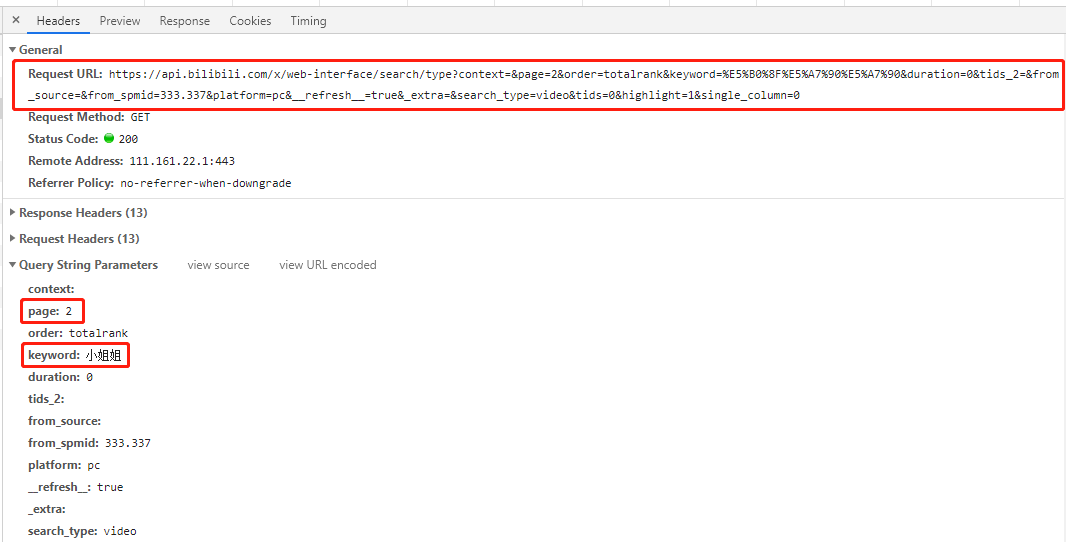
这是一个get请求,请求参赛数中有page和keyword两个参赛,分别对应请求的页码和关键字。
多查看几页找一下规律:
# 第一页
'https://api.bilibili.com/x/web-interface/search/all/v2?context=&page=1&order=totalrank&keyword=%E5%B0%8F%E5%A7%90%E5%A7%90&duration=0&tids_2=&from_source=&from_spmid=333.337&platform=pc&__refresh__=true&_extra=&tids=0&highlight=1&single_column=0'
# 第二页
'https://api.bilibili.com/x/web-interface/search/type?context=&page=2&order=totalrank&keyword=%E5%B0%8F%E5%A7%90%E5%A7%90&duration=0&tids_2=&from_source=&from_spmid=333.337&platform=pc&__refresh__=true&_extra=&search_type=video&tids=0&highlight=1&single_column=0'
# 第三页
'https://api.bilibili.com/x/web-interface/search/type?context=&page=3&order=totalrank&keyword=%E5%B0%8F%E5%A7%90%E5%A7%90&duration=0&tids_2=&from_source=&from_spmid=333.337&platform=pc&__refresh__=true&_extra=&search_type=video&tids=0&highlight=1&single_column=0'
可以看到除了第1页不一样外,其他几页url中只有page参数不一样,那么我们尝试一下第1页也用其他页的url请求一下,结果会发现同样可以出来想要的结果(自己试试)。
结论:所有页url只有page参数不一样,其他均一致。
# 导包
import re
import time
import json
import random
import requests
from fake_useragent import UserAgent
2.2 获取页面信息
# 获取页面信息
def get_datas(url,headers):
    r = requests.get(url, headers=headers)
    r.raise_for_status()
    r.encoding = chardet.detect(r.content)['encoding']
    datas = json.loads(r.text)
    return datas
# 获取图片链接信息
def get_hrefs
(datas):
titles,hrefs = [],[]
for data in datas['data']['result']:
# 标题
title = data['title']
# 时长
duration = data['duration']
# 播放量
video_review =data['video_review']
# 发布时间
date_rls = data['pubdate']
pubdate = time.strftime('%Y-%m-%d %H:%M', time.localtime(date_rls))
# 作者
author = data['author']
# 图片链接
link_pic = data['pic']
href_pic = 'https:' + link_pic
titles.append(title)
hrefs.append(href_pic)
return titles, hrefs
代码解析了视频标题,时长,播放量,发布时间,作者,图片链接等参数,这里我们只取标题和图片链接,其他参数可根据需要自行增、删。
# 保存图片
def download_jpg(titles, hrefs):
    path = "D:/B站小姐姐/"
    if not os.path.exists(path):
        os.mkdir(path)
    for i in range(len(hrefs)):
        title_t = titles[i].replace('/','').replace(',','').replace('?','')
     title_t = title_t.replace(' ','').replace('|','').replace('。','')
        filename = '{}{}.jpg'.format(path,title_t)
        with open(filename, 'wb') as f:
            req = requests.get(url=hrefs[i], headers=headers)
            f.write(req.content)
            time.sleep(random.uniform(1.5,3.4))
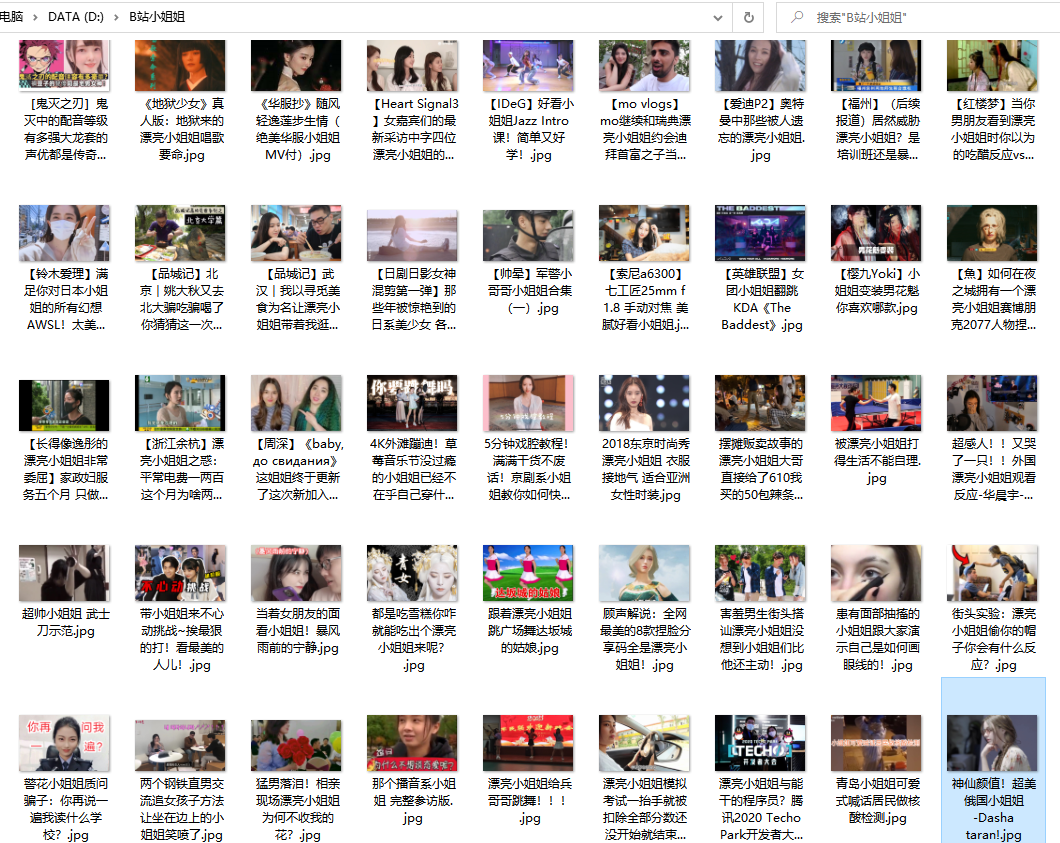
这里我们用标题作为图片名称进行存储,需要注意文件名称不能包含特殊符号,这里过滤了” / ,。|“等4种(每天视频有增删,可能有出入,需要自己调整,也可以不使用标题做名称)。
以上就是本期案例的全部内容。获取文中相关代码,可在公众号后台回复 小姐姐
如果文章对你有帮助,欢迎转发/点赞/收藏~
作者:欧King
_往期文章推荐_