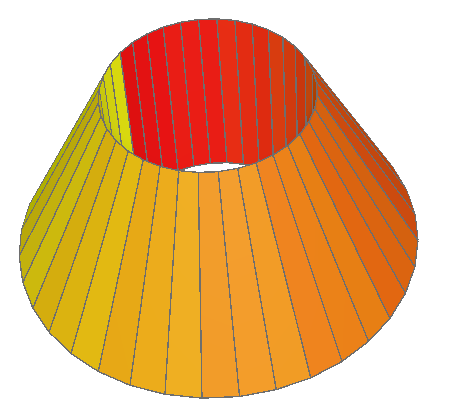
import arcpy
from math import pi, cos, sin
import os

# 1. 设置数据库和要素类名称
gdb_path = r"C:\Your\Workspace\Path"  # 修改为你的文件夹路径
gdb_name = "trunccone.gdb"
gdb_full = os.path.join(gdb_path, gdb_name)
fc_name = "TruncatedConePolygonZ"

# 2. 创建文件地理数据库(如不存在)
if not arcpy.Exists(gdb_full):
    arcpy.CreateFileGDB_management(gdb_path, gdb_name)

# 3. 创建带Z的Polygon要素类,坐标系EPSG:3857
sr = arcpy.SpatialReference(3857)
fc_full = os.path.join(gdb_full, fc_name)
if not arcpy.Exists(fc_full):
    arcpy.CreateFeatureclass_management(
        out_path=gdb_full, out_name=fc_name, geometry_type="POLYGON",
        spatial_reference=sr, has_z="ENABLED"
)

# 4. 几何参数
bottom_radius = 200
top_radius = 100
height = 200
num_points = 36

# 5. 生成底面和顶面圆的坐标
bottom_pts = [
    arcpy.Point(
        bottom_radius * cos(2 * pi * i / num_points),
        bottom_radius * sin(2 * pi * i / num_points),
0
) for i in range(num_points)
]
top_pts = [
    arcpy.Point(
        top_radius * cos(2 * pi * i / num_points),
        top_radius * sin(2 * pi * i / num_points),
        height
    ) for i in range(num_points)
]

# 6. 插入36个带Z的侧面Polygon
with arcpy.da.InsertCursor(fc_full, ["SHAPE@"]) as cursor:
for i in range(num_points):
        i_next = (i + 1) % num_points
# 四边形面
array = arcpy.Array([
            bottom_pts[i],
            bottom_pts[i_next],
            top_pts[i_next],
            top_pts[i],
            bottom_pts[i]  # 闭合
])
        poly = arcpy.Polygon(array, sr, has_z=True)
        cursor.insertRow([poly])

print(f"已完成:{fc_full},生成36个带Z的三维多边形面!")