主要使用的是wkhtmltopdf的Python封装——pdfkit
安装
1. Install python-pdfkit:
$ pip install pdfkit
2. Install wkhtmltopdf:
$ sudo apt-get install wkhtmltopdf
sudo yum intsall wkhtmltopdf
brew install Caskroom/cask/wkhtmltopdf
使用
一个简单的例子:
    import pdfkit

    pdfkit.from_url('http://google.com', 'out.pdf')
    pdfkit.from_file('test.html', 'out.pdf')
    pdfkit.from_string('Hello!', 'out.pdf')
你也可以传递一个url或者文件名列表:
pdfkit.from_url(['google.com', 'yandex.ru', 'engadget.com'], 'out.pdf')
pdfkit.from_file(['file1.html', 'file2.html'], 'out.pdf')
也可以传递一个打开的文件:
with open('file.html') as f:
    pdfkit.from_file(f, 'out.pdf')
如果你想对生成的PDF作进一步处理, 你可以将其读取到一个变量中:
pdf = pdfkit.from_url('http://google.com', False)
你可以制定所有的 wkhtmltopdf 选项 http://wkhtmltopdf.org/usage/wkhtmltopdf.txt. 你可以移除选项名字前面的 '--' .如果选项没有值, 使用None, False or * 作为字典值:
options = {
'page-size': 'Letter',
'margin-top'
: '0.75in',
'margin-right': '0.75in',
'margin-bottom': '0.75in',
'margin-left': '0.75in',
'encoding': "UTF-8",
'no-outline': None
}
pdfkit.from_url('http://google.com', 'out.pdf', options=options)
默认情况下, PDFKit 将会显示所有的 wkhtmltopdf 输出. 如果你不想看到这些信息,你需要传递一个 quiet 选项:
options = {
    'quiet': ''
    }

pdfkit.from_url('google.com', 'out.pdf', options=options)
由于wkhtmltopdf的命令语法 , TOC 和 Cover 选项必须分开指定:
toc = {
    'xsl-style-sheet': 'toc.xsl'
}

cover = 'cover.html'

pdfkit.from_file('file.html', options=options, toc=toc, cover=cover)
当你转换文件、或字符串的时候,你可以通过css选项指定扩展的 CSS 文件。
css = 'example.css'
pdfkit.from_file('file.html', options=options, css=css)
css = ['example.css', 'example2.css']
pdfkit.from_file('file.html', options=options, css=css)
你也可以通过你的HTML中的meta tags传递任意选项:
body = """
Hello World!
"""
pdfkit.from_string(body, 'out.pdf')
配置
每个API调用都有一个可选的参数。这应该是pdfkit.configuration()API 调用的一个实例. 采用configuration 选项作为初始化参数。可用的选项有:
示例 :针对wkhtmltopdf不在系统路径中(不在$PATH里面)
PATH里面):
config = pdfkit.configuration(wkhtmltopdf='/opt/bin/wkhtmltopdf'))
pdfkit.from_string(html_string, output_file, configuration=config)
问题
IOError:'No wkhtmltopdf executable found':
确保 wkhtmltopdf 在你的系统路径中(PATH), 会通过 configuration进行了配置 (详情看上文描述)。 在Windows系统中使用where wkhtmltopdf命令 或 在 linux系统中使用 which wkhtmltopdf 会返回 wkhtmltopdf二进制可执行文件所在的确切位置.
如果出现这个错误意味着 PDFKit不能处理一个输入。你可以尝试直接在错误信息后面直接运行一个命令来查看是什么导致了这个错误 (某些版本的 wkhtmltopdf会因为段错误导致处理失败)
确保两项:
1)、你的系统中有中文字体
2)、在html中加入
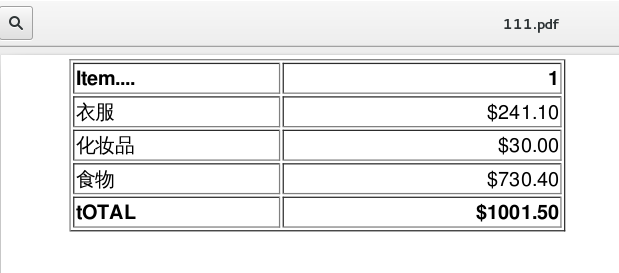
下面是我随便写的一个HTML表格:
<html>
<head><meta charset="UTF-8">head>
<body>
<table width="400" border="1">
<tr>
<th align="left">Item....th>
<th align="right">1th>
tr>
<tr>
<td align="left">衣服td>
<td align="right">$241.10td>
tr>
<tr>
<td align="left">化妆品td>
<td align="right">$30.00td>
tr>
<tr>
<td align="left">食物td>
<td align="right">$730.40td>
tr>
<tr>
<th align="left">tOTALth>
<th align="right">$1001.50th>
tr>
table>
body>
html>
下面是生成的PDF截图
 原文链接:http://www.cnblogs.com/taceywong/p/5643978.html
点击【阅读原文】在线转换为PDF
学习Python和网络爬虫,关注公众号:datanami

近期文章:
给Python新手的一道面试题:如何正确读写文件
10行Python代码实现目标检测
wtfPython—Python中一些奇妙的代码
不使用异步IO爬虫,就是OUT
python爬虫-- Scrapy入门
Python爬虫库-Beautiful Soup的使用
wtfPython—Python中一些奇妙的代码
秒懂系列 | 史上最简单的Python Django入门教程



