一、背景引入
一提到B站,第一印象就是视频,相信很多小伙伴和我一样,都想着去利用网络爬虫技术获取B站的视频吧,但是B站视频其实没有那么好拿到的,关于B站的视频获取,之前有介绍通过you-get库进行实现,感兴趣的小伙伴可以看这篇文章:You-Get 就是这么强势!。
言归正传,经常在B站上学习的小伙伴们可能经常会遇到有的博主连载几十个,甚至几百个视频,尤其像这种编程语言、课程、工具使用等连续的教程,就会出现选集系列,如下图所示。
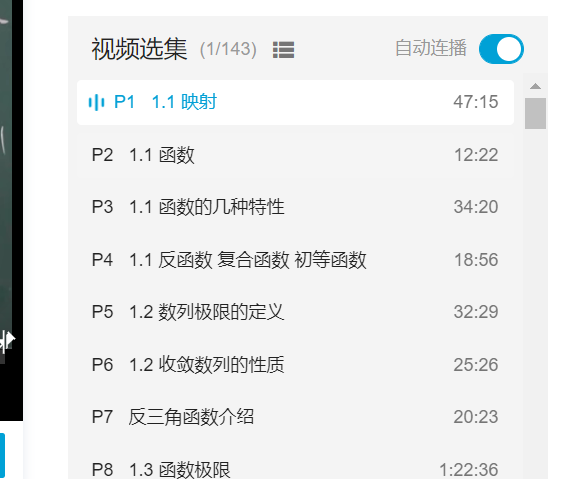
当然这些选集的字段我们肉眼也是可以看得到的。只是通过程序来实现的话,可能真没有想象的那么简单。那么这篇文章的目标呢,就是通过Python网络爬虫技术,基于selenium库,实现视频选集的获取。
二、具体实现
这篇文章我们用的库是selenium,这个是一个用于模拟用户登录的库,虽然给人的感觉是慢,但是在网络爬虫领域,这个库还是用的蛮多的,用它来模拟登录、获取数据屡试不爽。下面是实现视频选集采集的所有代码,欢迎大家亲自动手实践。
from selenium import webdriverfrom selenium.webdriver.common.by import Byfrom selenium.webdriver.support import expected_conditions as EC
from selenium.webdriver.support.wait import WebDriverWait
class Item: page_num = "" part = "" duration = ""
def __init__(self, page_num, part, duration): self.page_num = page_num self.part = part self.duration = duration
def get_second(self): str_list = self.duration.split(":") sum = 0 for i, item in enumerate(str_list): sum += pow(60, len(str_list) - i - 1) * int(item)
return sum
def get_bilili_page_items(url): options = webdriver.ChromeOptions() options.add_argument('--headless') options.add_experimental_option('excludeSwitches', ['enable-automation'])
browser = webdriver.Chrome(options=options) print("正在打开网页...") browser.get(url)
print("等待网页响应...") wait = WebDriverWait(browser, 10) wait.until(EC.visibility_of_element_located((By.XPATH, '//*[@class="list-box"]/li/a')))
print("正在获取网页数据...") list = browser.find_elements_by_xpath('//*[@class="list-box"]/li') itemList = []
second_sum = 0
for t in list: element = t.find_element_by_tag_name('a') arr = element.text.split('\n') print(" ".join(arr)) item = Item(arr[0], arr[1], arr[2]) second_sum += item.get_second() itemList.append(item)
print("总数量:", len(itemList))
print("总时长/分钟:", round(second_sum / 60, 2)) print("总时长/小时:", round(second_sum / 3600.0, 2))
browser.close()
return itemList
get_bilili_page_items("https://www.bilibili.com/video/BV1Eb411u7Fw")
这里用到的选择器是xpath,利用视频示例是B站的《高等数学》同济版 全程教学视频(宋浩老师)视频选集,大家如果想抓取其他视频选集的话,只需要更改上述代码的最后一行的URL链接即可。
三、常见问题
在运行过程中小伙伴们应该会经常遇到这个问题,如下图所示。
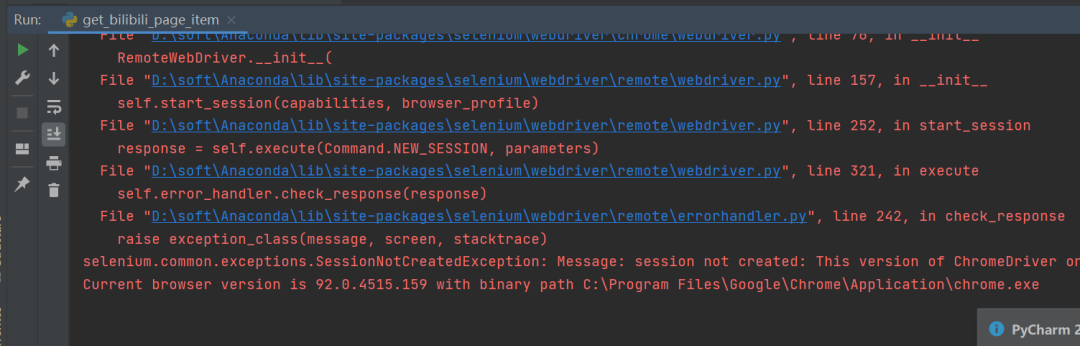
这个是因为谷歌驱动版本问题导致的,只需要根据提示,去下载对应的驱动版本即可,驱动下载链接: