众所周知,进行机器学习建模的第一步就是数据预处理,在数据预处理的过程中,处理缺失值则是关键一步。在数据集规模较小的情况下,如果对缺失值进行贸然的删除,则会导致本就不多的数据更为稀少。所以我们需要对缺失值进行一定的填补。
在填补的方法中,有直接用0填补的,有用均值的,有用中位数的,还有用众数的
这些方法虽然简单,但是对数据集的还原程度不高,所以今天为大家介绍如何使用随机森林的方法预测并且填补缺失值
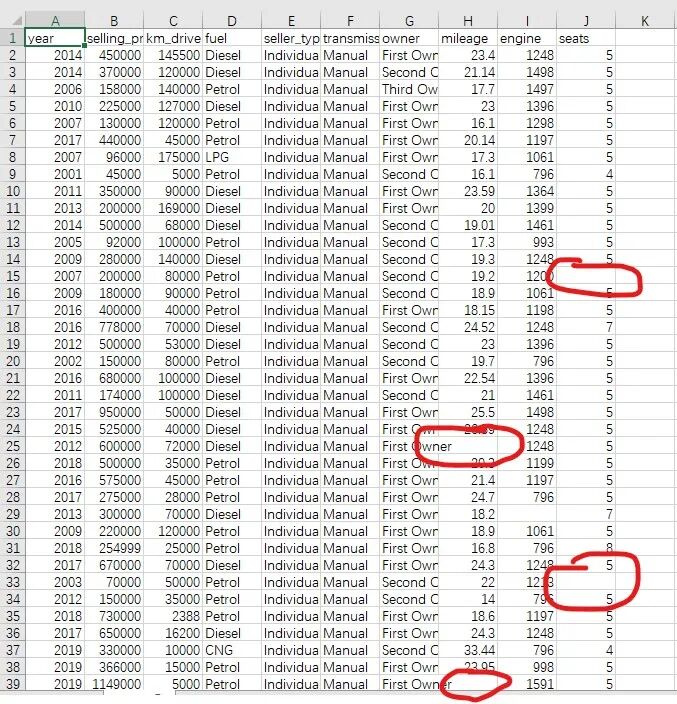
我们先来看看这个数据集
 img
img它有许多缺失值,我们先对这个数据集进行探索
import numpy as np
import pandas as pd
data = pd.read_csv("test-2.csv")
观察数据
data
| year | selling_price | km_driven | fuel | seller_type | transmission | owner | mileage | engine | seats |
|---|
| 0 | 2014 | 450000 | 145500 | Diesel | Individual | Manual | First Owner | 23.40 | 1248.0 | 5.0 |
| 1 | 2014 | 370000 | 120000 | Diesel | Individual | Manual | Second Owner | 21.14 | 1498.0 | 5.0 |
| 2 | 2006 | 158000 | 140000 | Petrol | Individual | Manual | Third Owner | 17.70 | 1497.0 | 5.0 |
| 3 |
2010 | 225000 | 127000 | Diesel | Individual | Manual | First Owner | 23.00 | 1396.0 | 5.0 |
| 4 | 2007 | 130000 | 120000 | Petrol | Individual | Manual | First Owner | 16.10 | 1298.0 | 5.0 |
| ... | ... | ... | ... | ... | ... | ... | ... | ... | ... | ... |
| 94 | 2009 | 175000 | 55500 | Petrol | Dealer | Manual | First Owner | 18.20 | 998.0 | 5.0 |
| 95 | 2013 | 525000 | 61500 | Petrol | Dealer | Manual | First Owner | 18.50 | 1197.0 | 5.0 |
| 96 | 2016 | 600000 | 150000 | Diesel | Individual | Manual | First Owner | 26.59 | 1248.0 | 5.0 |
| 97 | 2016 | 565000 | 72000 | Petrol | Dealer | Automatic | First Owner | 19.10 | 1197.0 | 5.0 |
| 98 | 2008 | 120000 | 68000 | Petrol | Dealer | Manual | Third Owner | 19.70 | 796.0 | 5.0 |
99 rows × 10 columns
data.info()
'pandas.core.frame.DataFrame'>
RangeIndex: 99 entries, 0 to 98
Data columns (total 10 columns):
 #   Column         Non-Null Count  Dtype
---  ------         --------------  -----
 0   year           99 non-null     int64
 1   selling_price  99 non-null     int64
 2   km_driven      99 non-null     int64
 3   fuel           99 non-null     object
 4   seller_type    99 non-null     object
 5   transmission   99 non-null     object
 6   owner          99 non-null     object
 7   mileage        94 non-null     float64
 8   engine         96 non-null     float64
 9   seats          94 non-null     float64
dtypes: float64(3), int64(3), object(4)
memory usage: 7.9+ KB
只有mileage、 engine 、seats有缺失值,其余都完整
重点关注文本数据
data["fuel"].value_counts()
Petrol    48
Diesel    48
LPG        2
CNG        1
Name: fuel, dtype: int64
data["seller_type"].value_counts()
Individual    65
Dealer        34
Name: seller_type, dtype: int64
data["transmission"].value_counts()
Manual       87
Automatic    12
Name: transmission, dtype: int64
data["owner"].value_counts()
First Owner     69
Second Owner    26
Third Owner      4
Name: owner, dtype: int64
对文本数据,一般采用onehot编码或者label编码
从语义上看owner这个属性的值是有明显的定序特征,不宜采用onehot编码,而其余都是分类属性,并且属性值的种类不多
不会对随机森林算法有过度的负面作用,所以可以采用onehot编码
def func(x: str) -> int:
    if x == "First Owner":
        return 1
    elif x == "Second Owner":
        return 2
    elif x == "Third Owner":
        return 3
对owner进行label编码
data["owner"].apply(func)
data["owner"].value_counts()
First Owner     69
Second Owner    26
Third Owner      4
Name: owner, dtype: int64
对其余文本属性,统一使用get_dummies方法进行onehot编码
data = pd.get_dummies(data)
data
| year | selling_price | km_driven | mileage | engine | seats | fuel_CNG | fuel_Diesel | fuel_LPG | fuel_Petrol | seller_type_Dealer | seller_type_Individual | transmission_Automatic | transmission_Manual | owner_First Owner | owner_Second Owner | owner_Third Owner |
|---|
| 0 | 2014 | 450000 | 145500 | 23.40 | 1248.0 | 5.0 |
0 | 1 | 0 | 0 | 0 | 1 | 0 | 1 | 1 | 0 | 0 |
| 1 | 2014 | 370000 | 120000 | 21.14 | 1498.0 | 5.0 | 0 | 1 | 0 | 0 | 0 | 1 | 0 | 1 | 0 | 1 | 0 |
| 2 | 2006 | 158000 | 140000 | 17.70 | 1497.0 | 5.0 | 0 | 0 | 0 | 1 | 0 | 1 | 0 | 1 | 0 | 0 | 1 |
| 3 | 2010 | 225000 | 127000 | 23.00 | 1396.0 | 5.0 | 0 | 1 | 0 | 0 | 0 | 1 | 0 | 1 | 1 | 0 | 0 |
| 4 | 2007 | 130000 | 120000 | 16.10 | 1298.0 | 5.0 | 0 | 0 | 0 | 1 | 0 | 1 | 0 | 1 | 1 | 0 | 0 |
| ... | ... | ... | ... | ... | ... | ... | ... | ... | ... | ... | ... | ... | ... | ... | ... | ... | ... |
| 94 | 2009 | 175000 | 55500 | 18.20 | 998.0 | 5.0 | 0 | 0 | 0 | 1 | 1 | 0 | 0 | 1 | 1 | 0 |
0 |
| 95 | 2013 | 525000 | 61500 | 18.50 | 1197.0 | 5.0 | 0 | 0 | 0 | 1 | 1 | 0 | 0 | 1 | 1 | 0 | 0 |
| 96 | 2016 | 600000 | 150000 | 26.59 | 1248.0 | 5.0 | 0 | 1 | 0 | 0 | 0 | 1 | 0 | 1 | 1 | 0 | 0 |
| 97 | 2016 | 565000 | 72000 | 19.10 | 1197.0 | 5.0 | 0 | 0 | 0 | 1 | 1 | 0 | 1 | 0 | 1 | 0 | 0 |
| 98 | 2008 | 120000 | 68000 | 19.70 | 796.0 | 5.0 | 0 | 0 | 0 | 1 | 1 | 0 | 0 | 1 | 0 | 0 | 1 |
99 rows × 17 columns
查看编码后的数据
data.info()
'pandas.core.frame.DataFrame'>
RangeIndex: 99 entries, 0 to 98
Data columns (total 17 columns):
 #   Column                  Non-Null Count  Dtype
---  ------                  --------------  -----
 0   year                    99 non-null     int64
 1   selling_price           99 non-null     int64
 2   km_driven               99 non-null     int64
 3   mileage                 94 non-null     float64
 4   engine                  96 non-null     float64
 5   seats                   94 non-null     float64
 6   fuel_CNG                99 non-null     uint8
 7   fuel_Diesel             99 non-null     uint8
 8   fuel_LPG                99 non-null     uint8
 9   fuel_Petrol             99 non-null     uint8
 10  seller_type_Dealer      99 non-null     uint8
 11  seller_type_Individual  99 non-null     uint8
 12  transmission_Automatic  99 non-null     uint8
 13  transmission_Manual     99 non-null     uint8
 14  owner_First Owner       99 non-null     uint8
 15  owner_Second Owner      99 non-null     uint8
 16  owner_Third Owner       99 non-null     uint8
dtypes: float64(3), int64(3), uint8(11)
memory usage: 5.8 KB
对每一列属性的缺失值个数进行求和统计
data.isnull().sum(axis=0)
year 0
selling_price 0
km_driven 0
mileage 5
engine 3
seats 5
fuel_CNG 0
fuel_Diesel 0
fuel_LPG 0
fuel_Petrol 0
seller_type_Dealer 0
seller_type_Individual 0
transmission_Automatic 0
transmission_Manual 0
owner_First Owner 0
owner_Second Owner 0
owner_Third Owner 0
dtype: int64
随机森林算法填充缺失值
先填充缺失值较少的的列,之后再填多的
原理:将要填补的列作为目标列,其余列作为属性列,用随机森林预测目标列的值进行填充
用非空的行作为训练集,空的行作为测试集,训练集中的数据有空值,则先用0填充
# 引入随机森林模型和填补缺失值的模型
from sklearn.impute import SimpleImputer
from sklearn.ensemble import RandomForestRegressor
首先去除特定的列得到属性列,记为X;选取特定的列作为目标列,记为Y
在得到的属性列中,用0填补缺失值
在目标列中选取非空的行的index作为选取训练集的依据,空行的index作为测试集的依据
这样就可以在X,Y中得到训练集和测试集了
有了训练集就把它们丢到随机森林训练,然后用训练好的模型预测测试集中的数据得到预测值
最后将预测值填到相应的位置中
for name in ["engine", "mileage", "seats"]:
    X = data.drop(columns=f"{name}")
    Y = data.loc[:, f"{name}"]
    X_0 = SimpleImputer(missing_values=np.nan, strategy="constant").fit_transform(X)
    y_train = Y[Y.notnull()]
    y_test = Y[Y.isnull()]
    x_train = X_0[y_train.index, :]
    x_test = X_0[y_test.index, :]

    rfc = RandomForestRegressor(n_estimators=100)
    rfc = rfc.fit(x_train, y_train)
    y_predict = rfc.predict(x_test)

    data.loc[Y.isnull(), f"{name}"] = y_predict
查看填充后的数据
data.info()
'pandas.core.frame.DataFrame'>
RangeIndex: 99 entries, 0 to 98
Data columns (total 17 columns):
 #   Column                  Non-Null Count  Dtype
---  ------                  --------------  -----
 0   year                    99 non-null     int64
 1   selling_price           99 non-null     int64
 2   km_driven               99 non-null     int64
 3   mileage                 99 non-null     float64
 4   engine                  99 non-null     float64
 5   seats                   99 non-null     float64
 6   fuel_CNG                99 non-null     uint8
 7   fuel_Diesel             99 non-null     uint8
 8   fuel_LPG                99 non-null     uint8
 9   fuel_Petrol             99 non-null     uint8
 10  seller_type_Dealer      99 non-null     uint8
 11  seller_type_Individual  99 non-null     uint8
 12  transmission_Automatic  99 non-null     uint8
 13  transmission_Manual     99 non-null     uint8
 14  owner_First Owner       99 non-null     uint8
 15  owner_Second Owner      99 non-null     uint8
 16  owner_Third Owner       99 non-null     uint8
dtypes: float64(3), int64(3), uint8(11)
memory usage: 5.8 KB
可以发现原有的缺失值已经被填好了
最后把结果导出为excel文件
data.to_excel("test-2(填补后).xlsx")



